

You can get better Instagram captions from free AI tools fast - but only if you give them clear inputs and review the draft before posting.
If I had to sum up the full guide in a few lines, it would be this:
- AI helps with drafting, not final approval
- Prompt quality shapes output quality
- A good caption needs a hook, context, value, a CTA, and a keyword-aware ending
- Post format matters: Reels, carousels, photos, and Stories need different caption lengths and structures
- Human review still has to check facts, tone, disclosures, and brand fit
- Performance data should guide future prompts, not guesswork
The article’s core point is simple: free AI caption generators save time on the first draft, but they do not replace judgment. A loose prompt often leads to weak, generic copy. A tighter prompt - one that includes the post type, audience, goal, proof point, tone, CTA, and words to avoid - usually gives you drafts that need less editing.
A few data points stand out:
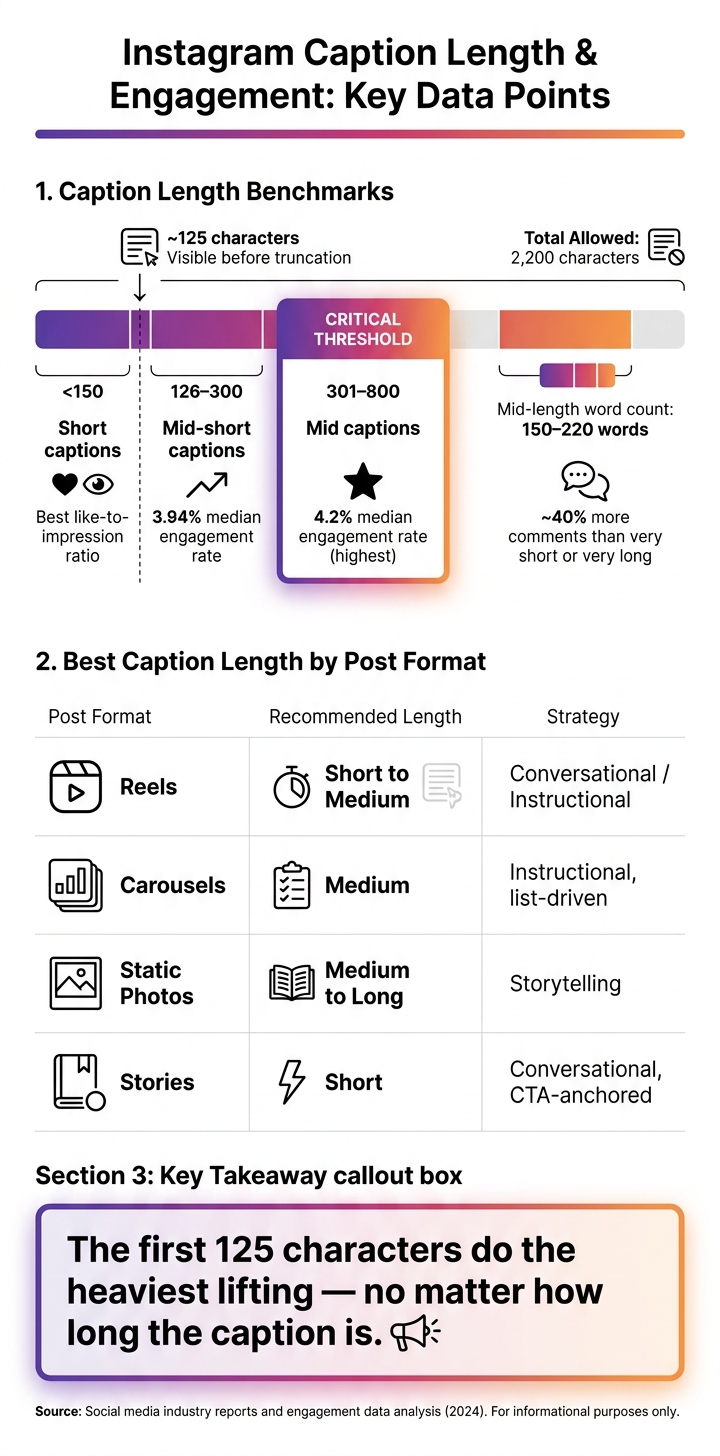
- Instagram captions can be up to 2,200 characters
- Only about the first 125 characters show before truncation
- Captions in the 301–800 character range see a 4.2% median engagement rate
- Captions in the 126–300 character range sit at 3.94%
- Mid-length captions of 150–220 words can drive about 40% more comments
- Captions under 150 characters often get the best like-to-impression ratios
That leads to a clear working rule:
- Reels: short to medium
- Carousels: medium and list-based
- Static posts: medium to long when more context is needed
- Stories: short and direct
What I like about the guide is that it stays practical. It does not treat AI as a magic fix. Instead, it shows a simple workflow: start with a short brief, use a reusable prompt, generate three versions, edit the strongest one, then check results after publishing. That is where the time savings come from.
Here’s the article in one plain-English snapshot:
| Focus Area | Main Point |
|---|---|
| What free tools do | Turn a short brief into caption drafts |
| What improves output | Clear prompts with facts, audience, goal, and tone |
| What makes a caption work | Hook, context, value, CTA, and keyword-rich ending |
| Best use by format | Reels short, carousels medium, photos longer if needed |
| What AI does well | Hooks, variants, and draft structure |
| What people must do | Check facts, disclosures, tone, links, and final fit |
| Best workflow | Prompt, draft 3 versions, edit, review, post, learn from results |
So if you want the shortest possible takeaway, it’s this: use AI to beat the blank page, then use human review to make the caption fit the post, the brand, and the facts.
That’s the full article boiled down into the points that matter most.
Create an Insta caption from a photo using AI
sbb-itb-3c55afb
How Free AI Caption Generators Work
Free AI caption generators take a short brief and turn it into several caption drafts you can review. That input is what turns a blank prompt into draft options you can actually use.
The Main Inputs These Tools Use
In most cases, you’ll enter a few core details: what’s in the photo, Reel, or carousel; who the post is for; the tone you want; the goal of the post; and any words or phrases you want included - or left out.
A tool might ask for things like:
- a short description of the post
- the target audience
- a tone of voice such as conversational, professional, or motivational
- a post goal like more saves or comments
- keywords or phrases to include or avoid
Format matters too. A Reel caption usually needs a strong hook right away because the video carries most of the context. A carousel caption often works better with a structure that nudges people to save the post. When you tell the tool what format you’re using, it can shape the draft around how that type of Instagram post tends to work.
Why Structured Prompts Beat Vague Requests
If you type something like "write an Instagram caption about sourdough," the tool doesn’t have much to go on. You’ll often get a generic caption that needs a full rewrite before you can use it.
A tighter brief works much better. When you spell out the format, audience, tone, and any phrases to avoid, the drafts usually come back more specific and much closer to publish-ready.
"AI solves the drafting bottleneck, not the judgment bottleneck. Human review still matters." - Arnab Dey, LunaBloom AI
Put simply, vague prompts lead to generic captions. Structured prompts lead to drafts that need less editing. And that makes the next round of caption edits a lot faster.
How to Get Better Captions From Free Tools
Instagram Caption Length vs. Engagement Rate: What the Data Shows
Better prompts lead to better drafts. If the tool has the right facts, knows who the post is for, and understands the angle, the output gets much easier to work with.
A Reusable Prompt Template for Instagram Captions
Copy this template and fill in the brackets for each post:
"Write three Instagram caption variants for a [post type: Reel / carousel / static photo] about [topic]. The audience is [audience + their main pain point]. The objective is [objective]. Use this proof point: [verified proof point]. The primary keyword is [keyword]. Sound [tone adjectives]. Start with a hook under 12 words, add one sentence of context, include a value section with steps or lessons, add one clear CTA to [CTA destination], and end with a keyword-rich closer. Avoid [phrases to avoid]. Return each variant with its character count for each variant."
The two fields that matter most are the verified proof point and the phrases to avoid. Those details often decide whether the caption sounds specific or generic.
Also, ask for at least three variants. That gives you a few angles to compare instead of getting stuck with the first draft.
How to Fix a Weak AI Draft
Once you have a draft with a decent structure, fix the weakest line first. Be direct about what’s off. Call out vague wording, add the facts it missed, ask for a stronger opening, or request a clearer format, like steps instead of one dense paragraph.
If the tool keeps missing the mark, build the caption in parts. Start with the hook. Then ask for one context sentence. Next, ask for the value section with three short steps. Finish with a clear CTA.
That slot-by-slot method gives you more control. You don’t have to accept or reject the whole caption in one shot.
Short vs. Long Instagram Captions: When to Use Each
After structure, length is the next thing to set. And the right length depends on the post type, not just the topic.
Instagram allows up to 2,200 characters per caption, but only the first ~125 characters show before the "more" truncation. That means the opening line does most of the heavy lifting no matter how long the caption is.
The data backs that up:
- Captions between 301 and 800 characters reach a 4.2% median engagement rate, a bit higher than the 3.94% seen in the 126–300 character range.
- Mid-length captions in the 150–220 word range bring in about 40% more comments than very short or very long versions.
- Captions under 150 characters produce the strongest like-to-impression ratios.
| Post Type | Best Length | Tone | Why It Works |
|---|---|---|---|
| Reel | Short to medium | Conversational or instructional | Video carries context; caption needs quick framing |
| Carousel | Medium | Instructional | List-driven structure earns saves |
| Static Photo | Medium to long | Storytelling or conversational | Post needs caption to carry the full context |
| Story | Short | Conversational | Question-led or CTA-anchored |
In plain English: use short captions for Reels, medium captions for carousels, and longer captions when the post needs more context. Once length is locked in, the draft is ready for human review and polish to get more followers on Instagram organically.
How to Edit, Review, and Publish AI-Generated Captions
Treat every AI output as a first draft, not a finished caption. The tool gives you speed and structure. Your job is to make the draft accurate, specific, and on-brand before it goes live.
Even with a strong prompt and the right caption length, you still need a human review before posting. That’s the step where a usable draft turns into something ready to publish.
What Human Review Still Has to Catch
AI drafts can sound polished, but they often drift into generic language. That’s where a human reviewer steps in and catches what the tool can’t check on its own.
Factual accuracy comes first. Check every product name, date, price, and link by hand. If a caption mentions a date, compare it with the original source.
Regulated claims and disclosures also need human review. If the post includes a partnership disclosure or any regulated claim, the wording needs to be clear and correct. AI won’t reliably add disclosure language or legal phrasing on its own.
Tone and brand fit matter too. A phrase that seems neutral in one setting can feel awkward in another. Human review is what catches slang, tone problems, and brand mismatches.
AI drafts fast; humans verify accuracy, compliance, and tone.
What AI Does Well vs. What Still Needs a Human
Use this split to decide what AI can draft and what has to stay with the reviewer.
| Task | AI Handles It | Human Required |
|---|---|---|
| Generating hooks, caption variants, and keyword-rich closers | ✓ Fast and consistent | - |
| Fact-checking details, managing disclosures, adjusting tone, and final approval | - | ✓ Required |
AI handles drafting; humans handle judgment and accuracy.
A Final Checklist Before You Post
Run the last pass in this order:
- Visual match: Does the caption match what’s actually shown in the photo, Reel, or carousel?
- Hook strength: Are the first 125 characters clear and persuasive on their own?
- Details verified: Are all dates, prices, links, and @mentions correct?
- Disclosures included: If the post includes a partnership disclosure, is it clearly visible near the top?
- Format: Do line breaks, emojis, and hashtags look right? Keep emojis sparse for accessibility.
- Human approved: Has a person approved the final version?
Use this checklist every time so caption review becomes a repeatable step instead of a last-minute fix. Once the process becomes routine, it supports a faster posting workflow.
A Practical Workflow for Consistent Instagram Growth
Once the draft is reviewed, the next move is to build a workflow you can use again and again. Caption generation should sit inside your posting process, not off on its own.
Start with a short brief: audience, subject, proof point, keyword, and post type. Drop that into a reusable prompt, generate three versions, then edit the strongest one.
After the post goes live, look at which prompts lead to more reach or saves. If a pattern starts falling flat, update the prompt template. That way, your prompts get better over time because they come from performance data, not gut instinct.
Standardize what works by using proven Instagram caption ideas so every new post starts from a stronger place.
How to Save Time Without Cutting Quality
A reusable prompt template means you don't have to start from zero for every post. Set your brand persona, banned phrases, and standard CTA destination once. Then plug in the post-specific details each time. It saves time and keeps human judgment where it matters most: the final pick.
"Strategic rule: Generate more options, publish fewer, and keep the human decision at the center." - Arnab Dey
You end up with faster drafting, tighter brand consistency, and a process your team can repeat without much friction.
Conclusion: Use AI for Speed, Keep Humans in Control
Free AI caption generators are useful for brainstorming angles, getting past writer's block, and turning out multiple drafts in seconds.
"AI captions work best as a distribution system, not a writing shortcut." - Arnab Dey, LunaBloom AI
Use AI for speed, and keep humans in control of the final caption.
FAQs
What should I include in an AI caption prompt?
Include six core details: the post description, target audience, tone of voice, goal, preferred caption length, and any rules or limits.
If you're writing for people in the United States, say U.S. English and American spelling.
You can also add a few extra directions, such as:
- a call to action
- emoji or formatting preferences
- a request to put the hook in the first 125 characters
- a request for 3–5 variations
That gives the writer a much clearer target and usually leads to better captions on the first try.
How do I know if my caption is too short or too long?
It depends on your content and what you want the post to do. Instagram cuts off captions after about 125 characters, so your opening needs to be short enough to make people tap for more.
For fast-scrolling posts like Reels or memes, keep captions around 125 to 150 characters. Short works better there because people move fast.
For educational carousels, longer captions can do more of the heavy lifting. Think around 400 characters, or even 1,200 to 2,000 characters, when you need extra context, storytelling, or deeper explanation.
The best way to figure out what lands? A/B testing. Try different caption lengths and see what gets more taps, saves, shares, or comments.
What should I check before posting an AI caption?
Always do a human review. Read the caption aloud to make sure it sounds natural and easy to follow, and check for grammar issues.
Also, confirm the first 125 characters have a strong hook, the tone matches your brand voice, the call to action is clear, any claims are accurate, and the caption fits the audience while working well for screen readers.


