

If I want more Instagram comments, I don’t need a smarter caption. I need a caption built to get a reply. The article’s main point is simple: use a short hook, add a bit of context, and end with one easy question. That matters because posts with questions can get 17% more comments, and clear CTAs can lift engagement by up to 23%.
Here’s the short version:
- I should use a hook → context/value → question format
- I should ask AI for 3–5 caption drafts, not just one
- I need to give AI clear inputs: post type, audience, tone, goal, length, and rules
- I should keep the first line tight because Instagram cuts captions after about 125 characters
- I should edit AI drafts before posting, since unedited AI captions can lag by about 4.2%
- I should test one change at a time and track comments, saves, shares, and DMs
The article also compares caption formats for different post goals, shows how audience details shape tone and wording, and explains how to turn analytics into better rewrites over a 10-post test run.
In short: AI helps with draft speed, but strong structure and human edits are what get people to talk.
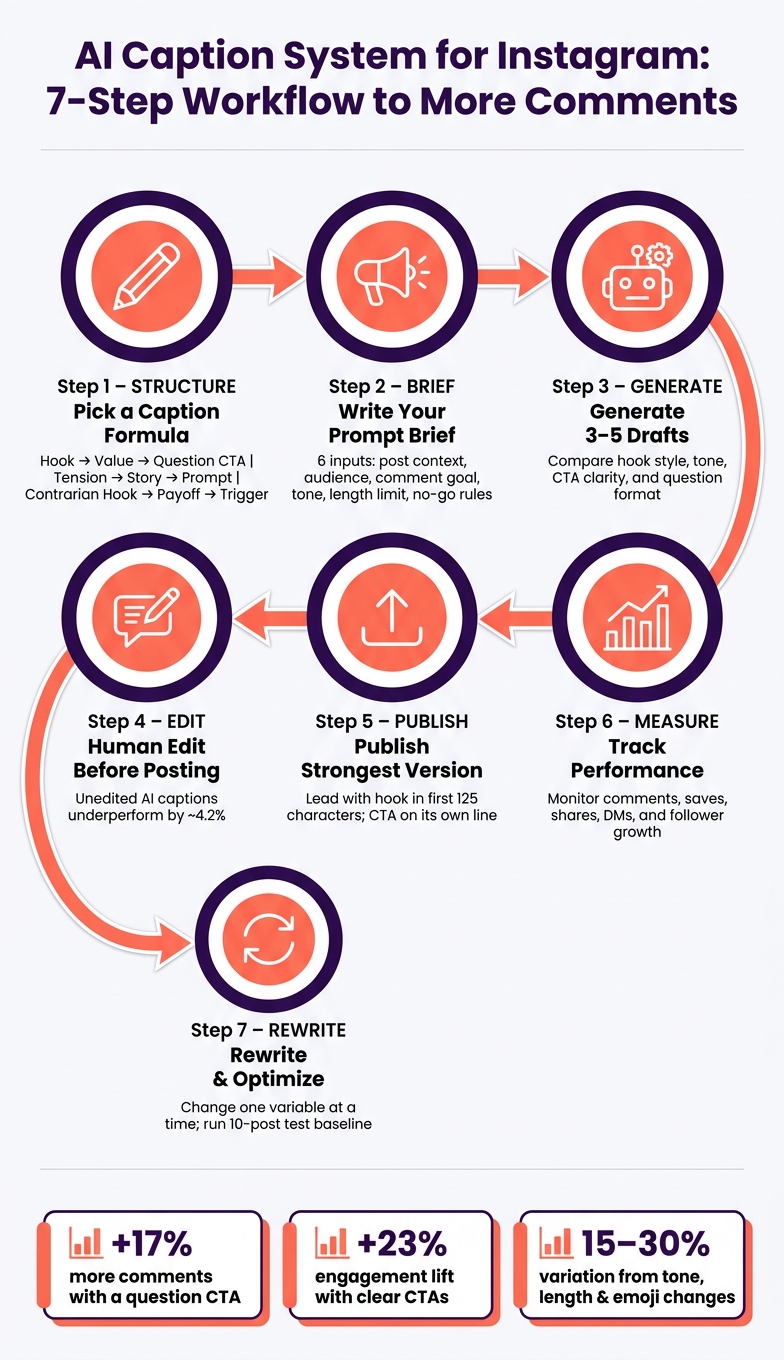
AI Caption System for Instagram: 7-Step Workflow to More Comments
How to Use ChatGPT for Instagram Captions: 10x More Reach (Copy This!)
If you're looking for more inspiration, check out these proven Instagram caption ideas to further boost your engagement.
sbb-itb-3c55afb
Build Caption Structures That Start Comments
Once AI gives you a draft, structure often decides whether people comment. A lot of captions miss that chance because they stop short instead of inviting people in.
Use proven formulas like Hook, Value, and Question CTA
Three formulas do most of the work when comments are the goal.
Hook → Value → Question CTA is the most flexible. Start with one sharp opening line that stops the scroll. Then use two to five short lines to share a useful tip or idea. Finish with one direct question.
That last part matters. A direct question makes commenting feel easier. Posts with questions in captions get 17% more comments on average than posts without them. And specific CTAs beat vague lines like "let me know your thoughts" by about 40%.
Tension → Story → Comment Prompt fits personal brand posts, case studies, and posts built around change. Start with a frustration your audience knows well, like "You're posting every day and still getting 3 likes." Then tell a short story that resolves that tension. Close with a prompt that asks followers to share their own version of the same problem. When people see themselves in the post, they're more likely to jump into the comments.
Contrarian Hook → Payoff → Comment Trigger is made for debate. Push against a common belief in the first line, explain the unexpected truth in the middle, and end with a prompt like "Agree or disagree?" This format helps your point of view stand out in your niche and often leads to more back-and-forth in the comments.
Across all three formulas, keep the lines short - one to two sentences per line - and put the question CTA on its own line at the end. That makes it much harder to miss.
Match caption format to post goal
Using the wrong structure for the wrong post is a common slip. A story-led caption on a product post can feel out of place. A contrarian hook on a community check-in can come off too sharp. This table shows where each format fits best.
| Formula | Best Use Cases | Strengths |
|---|---|---|
| Hook → Value → Question CTA | Educational carousels, before/after posts, product explainers | Clear path from attention to action; easy for AI to draft |
| Tension → Story → Comment Prompt | Personal brand, client wins, lessons learned | High relatability; drives longer, more detailed comments |
| Contrarian Hook → Payoff → Comment Trigger | Thought leadership, myth-busting, hot takes | Sparks debate; builds a distinctive brand voice |
Keep the CTA public, specific, and easy to answer.
With the structure in place, the next move is giving AI the right audience, tone inputs, and content ideas.
Write openings that work when captions are cut off
Instagram cuts captions after about 125 characters, so your hook has to do the heavy lifting right away. If it doesn't land in that small window, most people won't tap to read more. And if they don't read more, they may never see your question CTA.
The fix is simple: lead with your strongest idea.
Skip slow intros like "In today's post I want to share…" and get straight to the benefit, tension, or bold claim. For example, "You don't need 2 hours in the gym to see results" tells the reader both the topic and the payoff in under 60 characters. They can tell right away if it's for them.
When you ask AI to write captions, add this instruction directly: "Put the core topic and hook in the first sentence, under 125 characters, with no filler intro." That single line helps cut rambling openings and keeps the caption focused on the part that earns the tap.
Design AI Prompts With Audience and Tone Controls
Once the caption structure is in place, the next step is simple: tell the AI who the caption is for. Captions get much better when the brief matches the post, the audience, and the goal.
The 6 inputs AI needs for better caption drafts
Every prompt should include six inputs:
- post context
- audience
- comment goal
- tone
- length limit
- no-go rules
Here’s what that looks like in practice: a 10-second Reel showing a before-and-after home office makeover, aimed at busy U.S. professionals ages 25–40, with the goal of getting followers to share their biggest home office struggle. The tone is warm and practical, the caption stays under 150 words, and it avoids CTAs like "DM me" or "comment below."
It also helps to ask for 3–5 labeled drafts so you can compare different types of Instagram captions side by side, such as story-driven, question-led, or short and punchy versions.
With the brief set, narrow your voice and grow a new Instagram audience.
Add filters for age, location, language, and interests
Audience filters shape the vocabulary, examples, and tone of the question CTA. A prompt written for U.S. Gen Z college students ages 18–24 who love thrifting will sound very different from one aimed at U.S. parents ages 30–40 trying to make fast weeknight dinners. That shift changes the wording of the question CTA, not just the audience sitting behind it.
For U.S.-based brands, region and season matter too. If many followers are in the Northeast and Midwest and it’s mid-January, say that in the prompt. That keeps the AI from talking about summer vibes when people are dealing with cold weather. For language, plain U.S. English at a 7th–8th-grade reading level keeps captions easy to follow without losing meaning.
UpGrow's AI targeting filters - location, age, gender, language, and interests - help align reach with the audience you write for.
Control tone without sounding robotic
Pick the row that matches your niche, drop the suggested parameters into your prompt, and tweak from there.
| Tone Label | Typical Language Features | Best-Fit Niches | Risks for Conversation Quality | Suggested AI Prompt Parameters |
|---|---|---|---|---|
| Warm | Inclusive pronouns, soft encouragement, gentle questions | Lifestyle, Wellness, Coaching | Can become vague or sentimental | Use we and us, validate feelings, ask 1–2 story-sharing questions; warm tone lowers the barrier to sharing |
| Direct | Short sentences, imperative verbs, clear CTAs | Productivity, Business, Fitness | May sound blunt or dismissive | No filler, lead with the main benefit, balance one instruction with one empathetic line; direct tone makes answering feel fast |
| Playful | Light humor, wordplay, casual phrasing | Fashion, Entertainment, Gen Z brands | Risk of feeling off-brand | One joke per caption, avoid sarcasm and harsh jokes; playful tone makes replying feel low-stakes |
| Expert | Data-backed statements, clear explanations, minimal jargon | Finance, Health, Education | Can feel dry or inaccessible | Include 1–2 short data points, define jargon in plain terms; expert tone builds the trust that makes followers ask questions |
| Community-led | We framing, follower stories, open-ended questions | Niche hobbies, Local businesses, Non-profits | Can feel forced if the hook is weak | Highlight shared experiences, end with an open-ended question on a specific topic; community-led tone invites participation by default |
On the final pass, trim generic adjectives and stock phrases. Add at least one specific detail from the visual or brand story. Mix short and longer sentences. You can also use conversational markers like Honestly or Here's the thing once in a while, but not in every caption. That small tweak helps the draft sound specific instead of generic.
These controls make the draft much easier to test in the next section.
Use Examples, Testing, and Rewrites to Improve Results
Caption examples by niche and post type
Once you have the structure in place, examples make the choice easier. They help you line up the caption with the niche, the post format, and the kind of reply you want.
- Creator brands (photo or Reel): "The most common question I get is [question]. What's yours?"
- Local services (photo or Story): "Would you rather book mornings or evenings?"
- E-commerce (product carousel): "Which would you pick: [option A] or [option B]?"
- Coaches (Reel or quote card): "What's your biggest challenge right now?"
- Agencies (carousel or infographic): "What's your biggest focus right now: consistency, ideas, or results?"
Each example links a niche to one clear response type. That matters because vague prompts usually lead to vague replies.
Run a simple workflow from draft to publish to rewrite
After you choose a pattern, put it through a simple social media workflow you can use every week. Start with your prompt brief, generate 3–5 labeled caption options with different hook styles, publish the strongest one, then review the results and rewrite from there.
- Brief - Set the post goal, niche, audience, tone, and language. Define the exact conversation goal.
- Generate - Create 3–5 caption options. Compare the hook, question style, tone, and CTA clarity.
- Publish - Pick the strongest option and watch early comment patterns.
- Review/Rewrite - Check analytics. Find which version drove the most comments, saves, shares, and DMs. Then update the next prompt with the patterns that worked.
Change only one variable at a time - hook, length, tone, or CTA - so you can tell what made the difference. Tone, length, CTAs, and emojis can drive 15–30% variation in engagement. That's more than enough to justify steady testing.
Read analytics to decide what to rewrite
Use performance data to guide the next draft. Your dashboard should show which captions bring in comments, saves, shares, DMs, and follower growth.
Comment quality matters just as much as comment count. A caption that gets detailed replies - like buyers explaining why they prefer one option, or followers sharing a personal story - is doing better than one that gets one-word answers. Those longer replies also double as free audience research. They show you the words people use, the problems on their mind, and the posts you should make next.
Rewrite with a simple mindset: keep what worked, cut what fell flat, and test one change at a time.
Conclusion: Build a Repeatable AI Caption System
Use the same loop every time: pick a structure, write a focused prompt, draft 3–5 options, publish the version with the clearest hook and CTA, then track comments, saves, shares, and DMs. Once that system is set, using AI for Instagram marketing through testing becomes the fastest path to better captions.
Change only one variable at a time. That could be the hook style, the question format, or the length. Start by fixing weak hooks and weak CTAs first. Then use that testing method across a fixed 10-post run so you can spot a baseline sooner.
Run the same structure and prompt across your next 10 posts. After that, check Instagram Insights and keep the top-performing hook, question, and CTA from your three best posts based on comments, saves, and shares.
If you want targeting and tracking built into that same process, UpGrow can slot in there. It includes AI targeting filters for age, gender, location, language, and interests, along with live analytics to track what connects with real followers.
Structure → prompt → filter → generate → publish → measure → rewrite.
FAQs
How do I prompt AI for better Instagram captions?
Be specific. Describe the post, spell out your target audience, set the tone, state the goal, pick the caption length, and add a clear CTA like “save this” or “tap the link in bio.” Put the hook in the first line.
It also helps to ask for a few versions instead of just one. Then A/B test them with Instagram Insights and look at engagement, saves, and CTR. That gives you hard feedback, so you can tighten your prompt based on what people actually respond to.
What kind of question gets more Instagram comments?
Specific questions usually drive more Instagram comments, especially when they use you or your. That small shift can boost engagement by 47%.
So instead of asking broad, open-ended questions, go with prompts that are direct and easy to answer. For example, ask whether someone’s guilty of a certain habit or if they want a follow-up post. It lowers the effort needed to reply, and that often means more comments.
You can also get a lift by ending your caption with a clear question. Doing that can increase comment rates by 34%. And if you want more than one-word replies, longer captions - 500+ characters - can help spark more meaningful discussion.
How long should I test one caption change before rewriting?
Test a caption change for 7 to 14 days. In most cases, 14 days is the sweet spot.
If you're running caption-length tests, give them 4 weeks so you can collect enough side-by-side data.
Try not to go past 30 days. At that point, creative fatigue can start to skew the results.
It also helps to give the algorithm 3 to 5 days to settle. And make sure the test runs for at least 7 days so you capture both weekday and weekend behavior.


