

If you want better motivational Instagram captions, don’t just look for a writing tool. Look for one that helps with ideas, tone, audience fit, and post results. In this article, I compare UpGrow, ChatGPT, Jasper, Copy.ai, Canva Magic Write, Flick, and Rytr across the parts that matter most: drafting, voice control, audience focus, testing, and analytics.
Here’s the short version:
- Motivational quote posts can perform well. One quote account cited here averages 5.77K likes with a 0.55% engagement rate, above the roughly 0.40% platform average.
- Better captions can lift engagement by about 30% when they use a strong opening and a clear CTA.
- For U.S. audiences, these posts often do best around 7:00–9:00 AM, lunch hours, and Sunday evenings.
- Prices range from free tools to paid plans like UpGrow from $39/month, Canva Pro at $14.99/month, and Rytr from $9/month.
- Some tools are better for writing fast. Others are better for tracking what leads to saves, shares, profile visits, and follows.
If I had to boil it down:
- Use ChatGPT for flexible caption drafts
- Use Jasper for steady brand voice
- Use Flick for hashtags, scheduling, and post data
- Use Canva Magic Write if you write and design in one place
- Use Rytr if your budget is tight
- Use UpGrow if you care most about growth tracking and audience filters
- Use Copy.ai if you want lots of caption versions fast
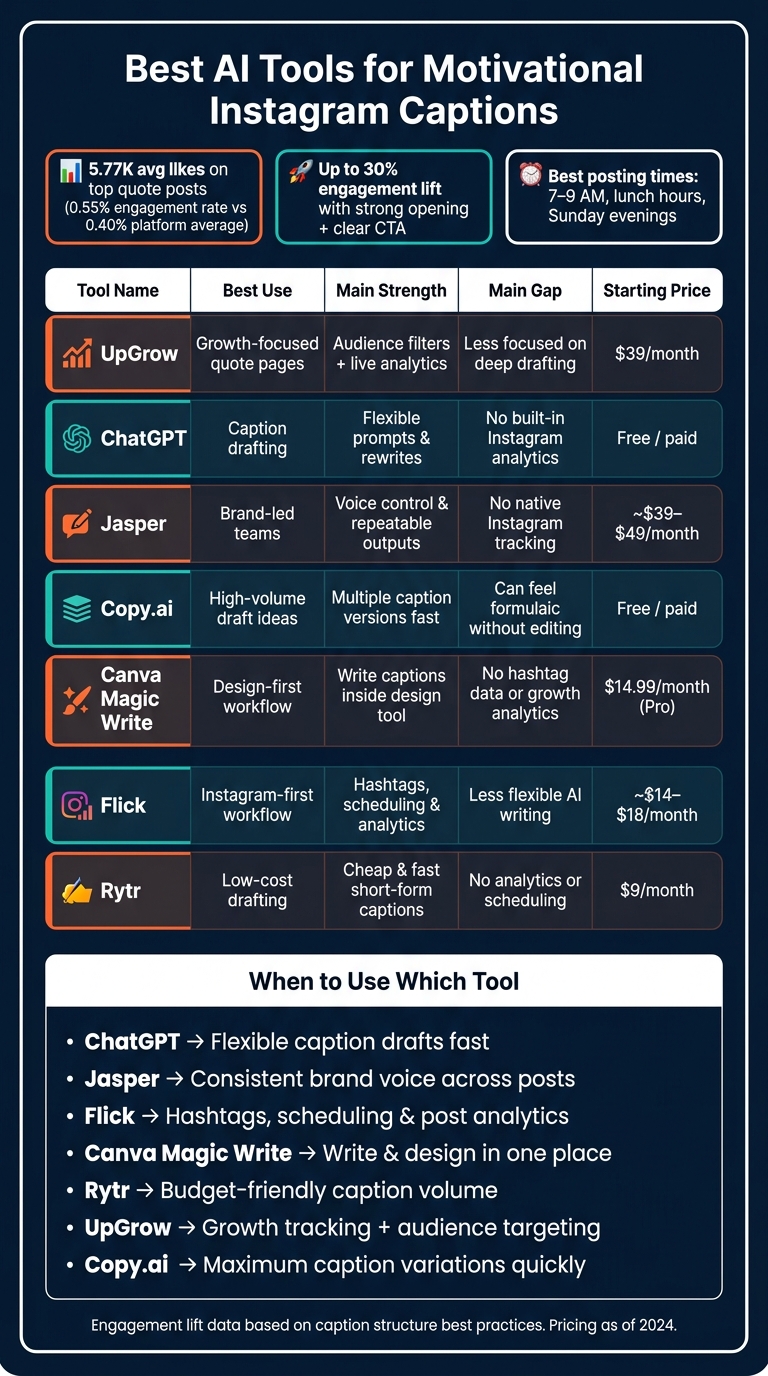
Best AI Tools for Motivational Instagram Captions: Side-by-Side Comparison
7 Best AI Tools to Instantly Generate Instagram Captions
sbb-itb-3c55afb
Quick Comparison
| Tool | Best use | Main strength | Main gap | Starting price |
|---|---|---|---|---|
| UpGrow | Growth-focused quote pages | Audience filters and live analytics | Less focused on deep draft writing | $39/month |
| ChatGPT | Caption drafting | Flexible prompts and rewrites | No built-in Instagram analytics | Free / paid plans |
| Jasper | Brand-led teams | Voice control and repeatable outputs | No native Instagram tracking | About $39–$49/month |
| Copy.ai | High-volume draft ideas | Multiple caption versions in seconds | Needs editing to avoid formula feel | Free / paid plans |
| Canva Magic Write | Design-first workflow | Write captions where you build posts | Limited analytics and no hashtag data | $14.99/month for Pro |
| Flick | Instagram-first workflow | Hashtags, scheduling, and analytics (see our guide on Instagram hashtags) | Writing is less flexible than LLM tools | About $14–$18/month |
| Rytr | Low-cost drafting | Cheap and fast short-form captions | No native analytics or scheduling | $9/month |
Bottom line: if you only need words, a writing tool is enough. If you want to learn what type of quote post grows your account, you’ll want a tool with testing or analytics too.
1. UpGrow
UpGrow helps quote posts do better by giving you ideas, shaping the tone, and showing what’s driving account growth. For motivational quote pages, that means better material before you post and clearer feedback after it goes live.
Idea Generation
UpGrow’s Free AI Instagram Content Ideas Generator and Caption Generator give you five caption options for each prompt. Its Viral Content Library also pulls in trending motivational and business topics, which helps you see what people are responding to before you write anything.
Tone Control
Inside the Caption Generator, creators can choose a preferred tone of voice to keep motivational captions in line with their brand. If you post on a schedule, that saves time. You don’t have to rewrite every draft by hand just to make it sound like your page.
Audience Targeting
This is where UpGrow stands out for quote accounts. Its Smart AI-Targeting uses filters like location, age, gender, language, interests, and hashtags to attract followers who are more likely to engage with motivational posts. For example, a U.S.-based motivation account could target English-speaking users ages 25–34 who are into self-improvement, business motivation, or hashtags like #motivationmonday and #entrepreneurmindset. Smart AI-Targeting then attracts followers who fit that profile. Plans start at $39/month and include Boost™ for campaign spikes.
Testing and Analytics
UpGrow’s live analytics dashboard tracks growth in real time, so you can see how quote posts affect reach, engagement, saves, shares, profile visits, and follows. Its AI-Powered Instagram Post Optimizer Tool, Engagement Rate Calculator, and Likes-to-Followers Ratio Calculator help you spot patterns. Say your audience responds more to short, punchy quotes than longer reflective captions - that kind of trend becomes easier to catch. PDF reports also make monthly or quarterly reviews faster and show which quote styles convert.
UpGrow makes the most sense when you already have caption ideas and want better direction on performance. It leans more toward strategy and tracking, while the next tool moves closer to hands-on caption writing.
2. ChatGPT
Where the previous tool is about growth signals, ChatGPT helps turn those signals into caption drafts. It shines as a drafting tool for motivational quote posts because it gives you structured options fast.
Idea Generation
Use ChatGPT to turn one quote into hooks, mini-stories, and CTA variations. A prompt like this works well: You're a social content strategist. My niche is personal growth for young professionals in the US. Generate 12 Instagram captions about resilience today; mix short hooks and 2–3 sentence mini-stories. If you want more options in one pass, ask for 10 short captions under 30 words and 5 micro-stories with hooks, lessons, and CTAs. That’s a simple way to build a library of attention-grabbing captions all at once.
Tone Control
Give ChatGPT 3–5 clear voice descriptors such as uplifting, grounded, practical, conversational, and non-cheesy instead of using a broad label like inspirational. That small change tends to lead to better drafts. If the first version still feels flat or generic, keep the original prompt tight and send a follow-up rewrite request.
Audience Targeting
ChatGPT can shift caption voice for different audience segments when you give it details like age range, profession, and pain points. For example, you can ask for separate caption versions for students, new managers, entrepreneurs, and fitness fans. Each version can use a different tone and CTA that fits the group.
Testing and Analytics
After you post, feed your results - saves, shares, and comments - back into ChatGPT and ask it to spot which hooks and CTAs led to the most engagement. Then use those patterns to shape your next prompt.
3. Jasper
Jasper is a marketing-focused AI writing tool built for on-brand caption drafts. Its Brand Voice setup, along with Memory and Audience inputs, helps keep motivational captions consistent from post to post.
Idea Generation
Jasper's Instagram caption templates can spin up several motivational caption ideas from a short brief. Give it a core message like discipline beats motivation, the goal of the post, and a target audience, and it can return a handful of ready-to-use options. For U.S. creators, a prompt like this works well: Write 5 motivational Instagram captions for young professionals in the U.S. starting their week; tone: inspirational yet practical; include an encouraging call-to-action. That gives you a simple way to turn one main idea into several publish-ready captions.
Tone Control
Jasper's Brand Voice feature helps keep your tone steady. You can train it with past captions and brand copy, then describe the voice you want in plain language - for example, supportive, direct, and conversational, with references to busy work weeks and weekend resets. You can also get more specific with descriptors like tough love, high-energy coach, or empathetic but direct. The payoff is fewer off-brand rewrites when you're posting a weekly motivational series.
Audience Targeting
Jasper's Memory feature can store audience segments, such as college students, early-career professionals, or small business owners. That makes it easier to shape the same motivational message for different groups while keeping the core brand voice in place. For example, a caption for entrepreneurs can lean into resilience, funding setbacks, and long hours without making you rebuild the voice setup from scratch.
Testing and Analytics
Jasper doesn't include native Instagram analytics, but it does make variation testing simple. You can generate four caption versions with different hooks and CTAs, post them in similar time windows, and check performance using Instagram analytics. Then you can feed those takeaways back into Brand Voice - for example, keeping captions under 150 words and opening with a bold statement if shorter posts earn more saves. Use Jasper to build and refine caption variants, then move to the next tool when you want a lighter drafting workflow.
This approach fits well into a broader social media workflow for consistent posting. That makes Jasper strongest for brand-consistent drafting, not post-level analytics.
4. Copy.ai
Copy.ai can generate a batch of caption options in under 30 seconds, which makes it handy for drafting quote posts at scale. Its sweet spot is simple: take one motivational idea and spin it into several short caption angles, fast. If your goal is volume first, polish second, it does the job well.
Idea Generation
The setup is simple. Enter a short description of your motivational message, pick a tone, and Copy.ai gives you 5–10 caption variations in one shot. Those drafts usually span a few styles at once, including short hooks, more reflective lines, and emoji-free versions.
That means you can compare options side by side instead of staring at a blank screen. For instance, a prompt about staying consistent in the gym for busy professionals in New York City can turn into a ready-to-review set of captions.
Tone Control
Copy.ai comes with tone presets like inspirational, empathetic, professional, witty, and casual. That gives you a decent starting point when you want the same message to land in different ways.
Its Brand Voice feature adds another layer. You can upload your best quote captions and use Brand Voice to keep new drafts in line with the same rhythm and tone. You can also spell out what to avoid, like hustle clichés, toxic positivity, or vague wording, which helps clean up the output.
Audience Targeting
Copy.ai adjusts motivational wording by audience if you build that context into the prompt. In plain English: the more specific you are about who it's for, the more the caption angle shifts to match.
You can also set up separate Brand Voice profiles for different groups. For example, one profile can lean into fitness-focused captions, while another fits career-growth content.
Testing and Analytics
Copy.ai does not connect to Instagram data on its own, so it doesn't offer built-in performance tracking. The usual workaround is pretty simple:
- Generate three to five caption variants
- Post them in similar time windows
- Track results in Instagram Insights
Then take what worked and feed it back into the system. If certain hooks, caption lengths, or CTAs drive more saves and shares, use those patterns in Brand Voice or future prompts to improve your Instagram growth tips. If you want something more lightweight for drafting, the next tool makes that process easier.
5. Canva Magic Write
Canva Magic Write lets creators draft motivational captions in the same place they build quote graphics. You open the design, write the caption in Canva, and keep the words and visuals lined up in one workflow. That makes Canva a strong pick for creators who want to write and design without bouncing between tools.
Idea Generation
Magic Write works well when you need a starting point for a content series. Open a Canva Doc, type /magic write, and use a prompt like: "Give me 10 motivational Instagram caption ideas for busy professionals in the U.S. who want to improve their morning routine."
It can give you themes like discipline, self-care, and time management, which is plenty to map out an Instagram content calendar. Magic Write has limited free uses, and Canva Pro starts at $14.99/month.
Tone Control
Magic Write includes tone presets such as Professional, Fun, Friendly, Polite, Formal, and Enthusiastic. For motivational quote posts, you can generate a draft, apply a tone preset, and then tweak the wording to match your brand voice. It’s a simple way to get close fast, then clean up the last 10%.
Audience Targeting
Specific audience details help steer the output. Add the reader’s age, situation, and goal to your prompt. For U.S. posts, call out American English and familiar references like miles, pounds, or work-week language.
Testing and Analytics
Canva's Content Planner lets you schedule posts straight to Instagram and track basic performance data, including impressions, likes, comments, and clicks. That makes it useful for simple caption tests. Try two caption versions, watch the numbers, and keep the one that gets more impressions, likes, comments, or clicks.
If you want deeper performance feedback, the next tool focuses more on caption analytics.
6. Flick
If you want to test captions more deeply, Flick brings hashtag data right into the writing process. It combines AI caption writing, hashtag research, scheduling, and analytics in one Instagram-first setup. In plain English: you can draft a post, pick hashtags, schedule it, and track how it did without bouncing between tools.
Idea Generation
Flick's AI assistant can brainstorm quote angles, draft captions, and group them into campaigns. Start with a broad theme like "30 days of resilience", "career growth affirmations", or "gym mindset for beginners", and Flick will give you several caption options to edit and schedule. You can also batch ideas into themes like "Mindset Monday" or "Friday Wins", then write captions for each post.
Tone Control
Flick lets you choose length, content type, tone, and point of view before it generates a caption. Its Brand Hub can also learn your voice, audience, and context from your website or Instagram profile. That helps cut generic, robotic copy and keeps the output closer to your brand voice.
Audience Targeting
Flick's hashtag tools help quote posts get in front of the right people by showing competition, reach, and engagement data. You can save hashtags into collections based on audience type, such as U.S. college students or women entrepreneurs, then attach the right set to each post. Flick's hashtag search works in 20+ languages. For U.S. quote posts, niche collections often beat broad tags.
Testing and Analytics
Flick's dashboard tracks essential Instagram metrics like reach, engagement, profile visits, and hashtag performance. That makes it easier to compare formats, like a short punchy quote versus a quote paired with a brief personal story, and see which one gets more saves and comments. As results come in, you can drop weak hashtags and swap in tags that fit better.
Pricing starts at about $14–$18 per month for Solo, while Pro starts at about $30–$38 per month.
That makes Flick a strong fit when you need to test caption quality and hashtag results side by side.
7. Rytr
After tools that lean hard into analytics, Rytr brings things back to basics: fast, low-cost caption drafting. It’s built for short-form captions, which makes it a good fit when you need ideas on the page fast without spending much.
Idea Generation
Rytr’s "Instagram Post Caption" template can generate up to three caption versions from one short brief. So if you enter something like "discipline over motivation for fitness beginners," you can review a few different hooks and emotional angles in one go.
That’s handy for quote-style captions too. Instead of just repeating the quote, the templates can add context, emotion, or a CTA around it. Once you have a draft, you can tighten the feel of it with Rytr’s tone presets.
Tone Control
Rytr includes 20+ tone presets for motivational content, including Inspirational, Convincing, Passionate, and Urgent. You can also use "My Voice" to keep batches of captions aligned with your brand voice.
Audience Targeting
Rytr doesn’t include audience research tools, so you’ll need to spell out the audience in your prompt. For example: "for college students in the U.S. who follow productivity creators on Instagram."
Testing and Analytics
Rytr doesn’t come with native analytics. Still, its speed makes variation testing much easier. In one test, Rytr generated 20 fitness captions in 25 minutes: 12 usable, 6 lightly edited, and 2 rewritten.
To judge what works, track saves, shares, comments, and engagement rate in Instagram Insights. That’s how you can spot which tone and caption structure gets the best response. The big win here is volume: when you need a lot of caption options without pushing costs up, speed does a lot of the heavy lifting.
Rytr’s Free plan includes about 10,000 characters per month. Unlimited costs about $9/month, and Premium costs about $29/month.
Pros and Cons of Each Tool for Quote-Style Instagram Growth
Each tool handles a different part of the motivational caption workflow. Some help with drafting. Some help with brand voice. Others focus on targeting, testing, or tracking growth. The table below shows where each one fits.
| Tool | Best Advantages | Main Limitations | Best For |
|---|---|---|---|
| UpGrow | Organic growth support, audience targeting, live analytics | Automated growth may not suit users who want full manual control | Solo creators & small businesses |
| ChatGPT | Fast idea expansion, flexible prompts | No native scheduling, hashtag data, or Instagram analytics | Solo creators & coaches |
| Jasper | Stable brand voice, team workflow | Starts around $39–$49/month; needs third-party analytics | Agencies & content teams |
| Copy.ai | Quick draft variations | Limited brand voice depth; captions can feel templated without editing | Solo creators & small businesses |
| Canva Magic Write | Caption drafting inside design workflow | Generic voice; no hashtag research or growth analytics | Solo creators & coaches |
| Flick | Instagram-focused captions, hashtags, scheduling | AI writing is less creative than dedicated LLMs | Instagram-first creators |
| Rytr | Low-cost, fast drafts | Around $9–$29/month; no scheduling, hashtag tools, or analytics | Budget-conscious solo creators |
The big split comes down to this: does the tool only write captions, or does it also help you test them and grow your account?
Instagram-first tools cut down on tool switching, which can save time and keep your workflow cleaner. General AI writing tools can still do the job, but you'll usually need separate apps for scheduling and analytics.
If you want quote posts linked to trackable growth, UpGrow stands out because it pairs caption help with organic growth tools in one place. That's where it has an edge for quote-style Instagram growth: your caption plan and follower growth stay connected.
Conclusion
Across all seven tools, the main things that matter are idea generation, tone control, audience targeting, and post-level feedback. The gap between these tools isn't only about writing faster. It's about whether a tool helps you draft posts, match your voice, reach the right audience, and learn from the results.
Good captions still need prompts shaped for Instagram. Generic instructions can leave engagement on the table.
After the caption is done, the next step is simple: does it reach the right audience, and can you improve it over time? UpGrow adds audience targeting, live analytics, and organic growth strategies support so motivational posts can reach the right U.S. users. Its live analytics dashboard shows which quote styles, caption lengths, and posting times drive results. That gives you clear data you can use in your next round of caption prompts.
Pick one caption tool, post on a steady schedule, track saves and shares for 30–90 days, and refine your prompts based on what performs best.
FAQs
How do I choose the right AI caption tool?
Start with your goals, brand voice, posting volume, audience, and preferred tone. Then pick a tool with strong tone and style controls so your captions sound like your brand every time.
It also helps to look at day-to-day fit. Check language support, hashtag suggestions, and analytics before you commit. Tools with live insights, like the UpGrow dashboard, can make it easier to track performance as you post.
If a free trial is available, test 3–5 tools for a week using the same prompts. That gives you a clean side-by-side comparison instead of guessing based on feature pages alone.
What makes a motivational Instagram caption perform better?
Better captions come from data, not gut feel. Lead with a strong hook in the first 125 characters, use a clear CTA, and match caption length to your audience. A simple flow helps too: hook, context, insight, CTA.
Keep the tone in line with your brand. Test one change at a time so you can see what moved the needle. Then track the metrics that matter:
- Engagement
- Saves
- Click-throughs
UpGrow’s AI tools can help refine captions, hashtags, and targeting, with human review to keep quotes genuine.
How long should I test captions before changing my strategy?
Use the 7-14-30 rule when you test: run a test for at least 7 days, aim for 14 days if you can, and stop by 30 days. Before you test anything, track your usual performance for 2–3 weeks so you have a baseline to compare against.
Also, leave a live post alone for its first 72 hours. If you edit it too soon, you can reset the learning phase and throw off your results.
For smaller accounts, try to get 50–100 engagements per variant. And if you’re testing a content pillar, give it the full 30 days before you make the call.


