

If Instagram flags a branded post, I’d do three things first: check the notice, confirm the Paid Partnership label and partner tag, and file one short policy-based appeal. That’s the core fix. Most branded content flags come from missing disclosure, the wrong tagged brand, or posts in restricted topics like alcohol, finance, health, gambling, or weight loss.
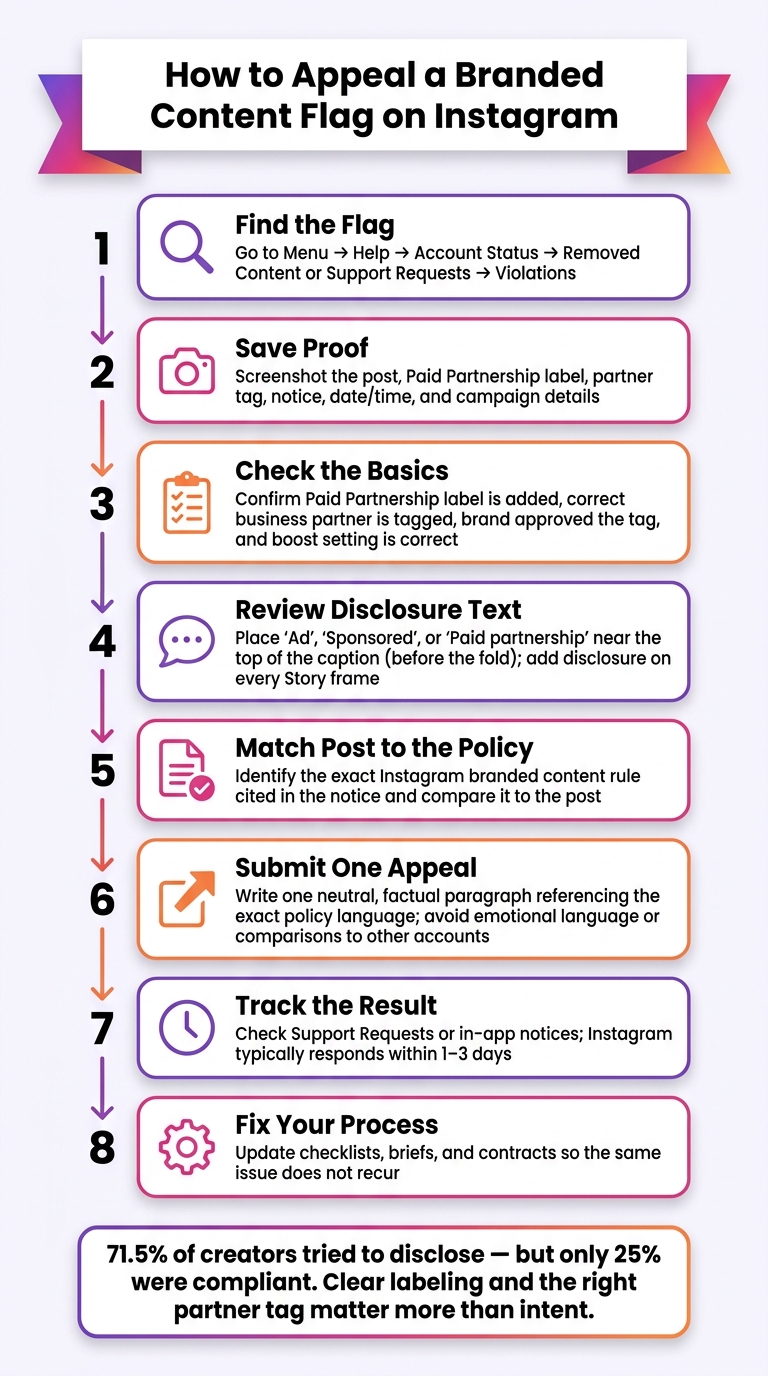
Here’s the short version:
- Find the flag in Account Status or Support Requests
- Save proof: screenshots of the post, label, tag, notice, and date
- Check the basics: Paid Partnership label, correct business partner, partner approval, boost setting
- Review disclosure text: use clear terms like “Ad”, “Sponsored”, or “Paid partnership”
- Match the post to the rule cited in Instagram’s notice
- Appeal once, with one calm paragraph based on the policy
- Track the result, which often comes in 1–3 days
- Fix your social media workflow so the same issue does not happen again
A big point from the article stood out to me: 71.5% tried to disclose, but only 25% were compliant. That gap shows why “close enough” disclosure often fails. Clear labeling and the right partner tag matter more than intent.
If I were handling this for a team, I’d treat each flag as a documentation problem first, and a policy problem second. That mindset keeps the appeal focused and gives Instagram something specific to review.
How to Appeal a Branded Content Flag on Instagram (Step-by-Step)
Review the flagged post before you appeal
Open the notice first. Then figure out exactly what Instagram flagged and why. That quick review helps you tell the difference between a simple setup issue and a bigger policy problem.
Find the notice in Account Status and Support Requests
Instagram shows enforcement notices in two places.
Go to your profile, then Menu → Help → Account Status → Removed content to find posts that were taken down. Tap the flagged post to read the policy details and see whether Request review is available.
You can also go to Menu → Help → Support Requests → Violations to check updates on open enforcement cases.
Before you edit anything, save proof of what happened. Take screenshots of:
- The post
- The notice
- The label
- The partner tag
- The date and time
- The campaign details
That record gives you something solid to use in the appeal.
Check labels, partner tags, and account eligibility
Start with the post settings. Make sure the Paid Partnership label was added, the right business partner was tagged, and the brand approved that partner tag. If the campaign was supposed to be boosted, check whether allow business partner to boost was turned on.
Account setup matters too. Instagram's branded content tools work only for Creator or Business accounts. Both the creator and the brand also need public profiles.
Check your account type and profile visibility in settings. Then review Account Status and your professional dashboard's monetization or partnership areas for any limits. If you're working on the brand or agency side, make sure connected business accounts are in good standing.
Also check the caption or Story text on its own, apart from Instagram's label. For feed posts and Reels, put "Ad", "Sponsored", or "Paid partnership" near the top of the caption, before the fold. For Stories, add a clear disclosure on every frame, not only the first.
Tell minor mistakes apart from serious policy violations
Not every flag means the same thing. Some are small setup errors. Others point to a bigger issue.
Minor problems often include:
- A missing partner tag
- An unapproved partner tag
- A disclosure that's hard to see
More serious violations include sponsorships with no disclosure at all, misleading health or financial claims, weight-loss claims, and age-restricted content like alcohol or gambling that wasn't age-gated the right way.
Use that distinction to compare the post with the exact Instagram policy rule tied to the flag before you appeal.
Next, compare the post against the specific branded content policy rule Instagram used.
sbb-itb-3c55afb
Compare the post against Instagram's branded content policies
Policy checks that most often trigger branded content flags
Use these three checks to figure out which rule Instagram likely applied.
First: did value change hands? If it did, the Paid Partnership label is required. That includes informal deals too. If money, free products, discounts, trips, perks, or any other form of value was part of the deal, Instagram can treat the post as branded content.
Second: is the tagged partner the actual paying brand? You need to tag the brand that actually paid for the post. The partner tag has to match the paying brand. If it doesn’t, that mismatch can trigger a flag. And if this is the issue, call it out plainly in the appeal.
Third: is the sponsorship obvious to an average viewer? Loose signals like #collab or #partner usually don’t count as clear disclosure. In the U.S., FTC guidance points to a direct label like "#ad" or "Sponsored" near the beginning of the caption.
Some topics get more scrutiny even when the disclosure is correct. That includes alcohol, finance, health, supplements, gambling, weight-loss, and cosmetic procedure content. So a post can have the right label and still get flagged. A Paid Partnership label does not fix other rule issues, like unsupported claims or missing age or location limits.
Creator, brand, and agency responsibilities
Before anything goes live, assign each rule to the right person. That matters because an appeal works better when you can show who handled the label, the tag approval, and the disclosure.
| Responsibility | Creator | Brand | Agency |
|---|---|---|---|
| Add Paid Partnership label | Enables the label before publishing | Confirms the label requirement in the brief | Verifies the label is live after publishing |
| Approve partner tag | Tags only brands that have granted approval | Grants tag approval | Confirms approval is in place before go-live |
| Caption and creative disclosure | Writes #ad or Sponsored near the top of the caption |
Reviews and approves final caption copy | Checks disclosure placement across all formats |
| Documentation | Saves screenshots of the post, label, and tag | Retains the signed contract and campaign brief | Archives approval threads and content calendar |
| Account monitoring | Checks Account Status after publishing | Monitors campaign compliance | Tracks enforcement notices across the campaign |
| Sensitive category compliance | Applies age or geo targeting when instructed | Provides targeting requirements for restricted products | Audits targeting settings before and after launch |
Brands also share responsibility when disclosure goes wrong, so spell out labeling and claim rules in the contract. Then save the approvals, briefs, and screenshots. That material can become your best appeal evidence. When you write the appeal, use the same rule wording tied to the flag instead of making a broad complaint about the decision.
Submit an appeal and track the result
Use Instagram's review path step by step
Once you've confirmed the policy issue, move fast. The goal is to keep the appeal tied to the original notice and the campaign timeline. Use the policy issue you found in the post review to shape the appeal.
Start from your profile, tap the three-line menu, then go to Settings and Privacy → Account Status under More info and support. Open the flagged post to see which policy Instagram says it violated, then tap Request a review or Appeal. After you confirm, the appeal is sent. You can track it in Support Requests.
Base the appeal on the exact policy language in the notice.
Send one appeal with one clear explanation. If you submit conflicting versions, you can hurt credibility and slow the review.
Write appeal wording that is factual and policy-based
Write the appeal like a compliance note, not a complaint. Keep it focused on four points: the post type and partnership context, the disclosure and tools you used, why the content follows the policy or what was misunderstood, and any correction already made.
Stay neutral and refer to the exact policy named in the flag. For example, you might explain that the Reel was a paid partnership with Brand X, disclosed with Instagram's paid partnership tag, and that the content does not promote restricted products and follows Instagram's branded content rules on clear sponsorship disclosure. That gives the reviewer something concrete to assess. Emotional language, or pointing to what other accounts posted, doesn't help in a policy review.
Put the post type, partnership context, disclosure used, policy basis, and any correction into one neutral paragraph.
Submit only one version so the reviewer sees one consistent explanation.
Next steps after the decision
After Instagram responds, document the outcome and update your team's process. Instagram usually responds within 1–3 days, and you'll see the result in Support Requests or through an in-app notice. There are three common outcomes, and each calls for a different move.
- If the content is restored, creators should make sure disclosures are still in place and share the result with the brand partner. Brands should update reporting. Agencies should save the appeal format that worked for future cases.
- If the decision is upheld, creators should remove similar posts and adjust future content. Brands should update briefs to fix the issue that caused the flag, such as a restricted product category or unclear sponsorship wording. Agencies should update internal compliance checklists and brief account managers on the exact policy cited.
- If the post is restored but account limits remain - such as limited access to branded content tools or monetization features - creators should watch Account Status to see when those limits expire and focus on fully compliant content in the meantime. Brands should account for those limits in campaign planning, and agencies handling multiple accounts should adjust posting schedules and budgets.
No matter the outcome, keep the appeal text and the final decision on file. That makes it easier to spot repeat triggers and move faster on future appeals.
Conclusion: How to prevent future branded content flags
Once the appeal is done, the next step is simple: make the fix part of your normal workflow.
What matters here is the gap between a one-off repair and a habit your team follows every time. That gap is bigger than it looks. Only 25% were compliant, even though 71.5% tried to disclose. That’s exactly why a pre-publish checklist matters. Good intent isn’t enough if the post still breaks the rules.
Turn each fix into a standing rule.
Immediate fix vs ongoing compliance
| Immediate fix | Ongoing compliance |
|---|---|
| Correct missing or incorrect Paid Partnership labels and partner tags on the flagged post | Standardize disclosure requirements in campaign briefs and creator contracts |
| Edit or remove non-compliant claims, hashtags, or CTAs from the flagged content | Train all collaborators on acceptable claims and restricted categories per Instagram's branded content policies |
| Pause related posts or ads while reviewing them against Instagram's rules | Run periodic branded content audits - monthly for active accounts, quarterly at minimum |
| Submit a concise, factual, policy-based appeal that notes corrections already made | Maintain a central repository of approvals, checklists, and contracts to prove compliance and speed up future appeals |
The main goal is to stop repeat flags. Save the appeal template, update your checklists, and treat each incident like a chance to tighten the process.
FAQs
Can I edit a flagged post before appealing?
Yes. In Instagram’s Account Status, you can usually edit, delete, or appeal flagged content.
If you think a post was flagged by mistake, you can edit it so it lines up with the rules before you appeal.
One thing to watch: if you keep editing or deleting flagged posts over and over, Instagram may keep restrictions in place for longer. In many cases, archiving the post is a safer move than deleting it.
What proof should I save for an Instagram appeal?
Keep clear records that show you followed Instagram and FTC rules. That includes:
- campaign briefs and partner disclosure guidelines
- time-stamped pre-publication checks
- screenshots or video frames showing the Paid Partnership label and plain-language disclosures like "Ad" or "Sponsored"
If you used automation, save records of the settings, posting schedules, and any changes made for compliance. It also helps to have your ID or business registration ready in case Instagram asks for verification.
Why would a post get flagged even with a Paid Partnership label?
A post can still get flagged if the disclosure isn't clear and easy to spot under FTC guidelines. Instagram wants plain-language labels like Ad or Sponsored at the start of the caption or shown on-screen, not buried in hashtags or tucked after “more.”
A flag can also happen when the label is hard to see, the business partner tag is missing or incorrect, or the post breaks rules around sensitive topics or restricted goods.


