

Most people watch short videos with the sound off, so your caption stack matters more than most creators think. This is a core pillar of short-form video content strategy today. If I were picking fast, I’d split this list into two jobs: use ChatGPT, Jasper, Copy.ai, Canva Magic Write, OwlyWriter AI, or Lately AI for the post caption, and use Kapwing, CapCut, Submagic, Pictory, or InVideo AI for the text inside the Reel.
Here’s the short version:
- Best for solo creators: ChatGPT + CapCut
- Best for brand voice control: Jasper
- Best for batch caption writing: Copy.ai
- Best for design-first work: Canva Magic Write
- Best for scheduling teams: OwlyWriter AI
- Best for turning long content into short posts: Lately AI
- Best for subtitle editing and SRT export: Kapwing
- Best for mobile editing: CapCut
- Best for animated word-by-word captions: Submagic
- Best for repurposing webinars or podcasts: Pictory
- Best for prompt-to-video workflows: InVideo AI
A few numbers stand out. Captioned videos can get 40% more views, and some data points to 7.32% higher lifetime views on average. That matters on Reels, where watch time and completion rate help decide how far a video goes viral.
What I like about this roundup is that it does more than list tools. It sorts them by job, price, team use, and workflow fit. So instead of asking, “What’s the best tool?” I’d ask, “What part of my process is slowing me down?”
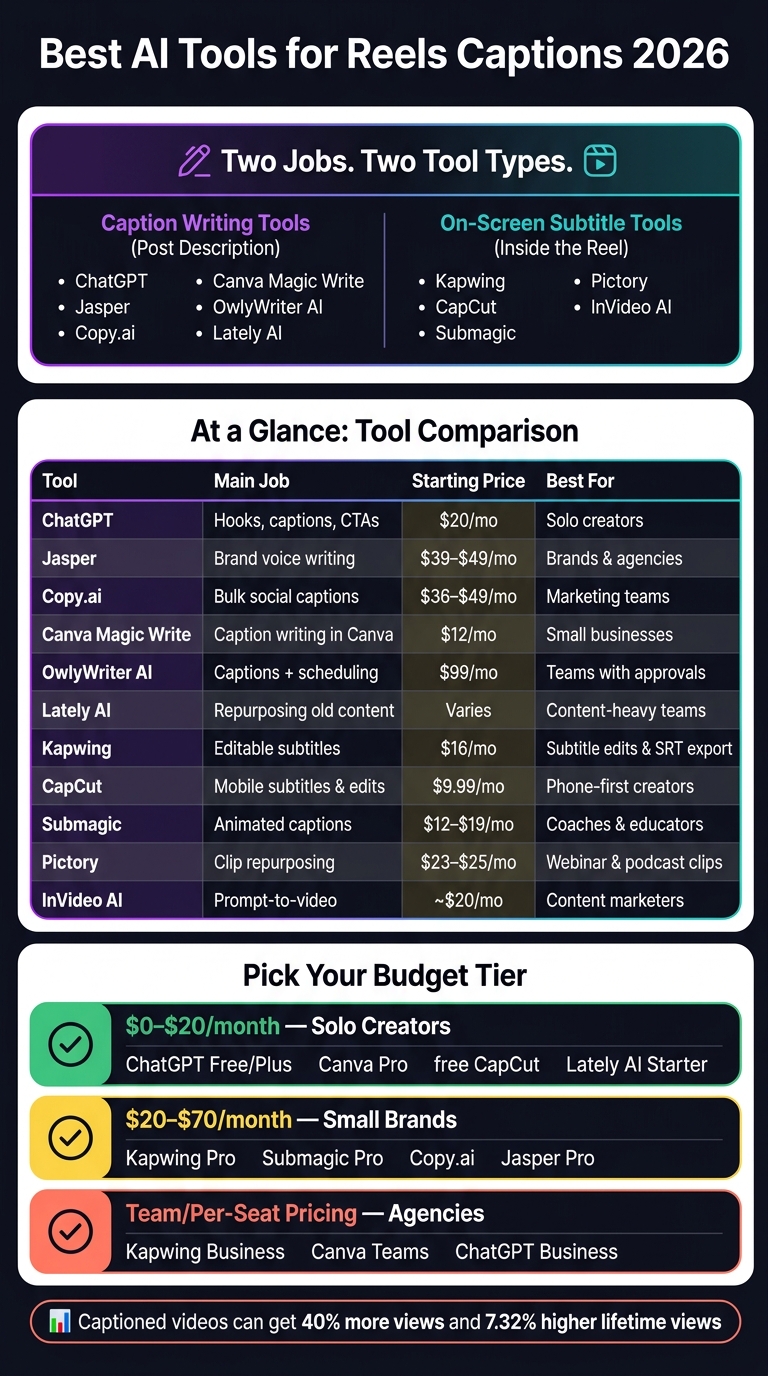
Best AI Tools for Reels Captions 2026: Full Comparison
CaptionBolt AI Tutorial & Review: Auto Captions for Shorts & Reels
sbb-itb-3c55afb
Quick Comparison
| Tool | Main Job | Starting Price | Best For |
|---|---|---|---|
| ChatGPT | Hooks, captions, and CTA ideas | $20/month | Solo creators |
| Jasper | Brand voice caption writing | $39–$49/month | Brands, agencies |
| Copy.ai | Bulk social captions | $36–$49/month | Marketing teams |
| Canva Magic Write | Caption writing inside Canva | $12/month | Small businesses |
| OwlyWriter AI | Caption writing + scheduling | $99/month | Teams with approvals |
| Lately AI | Repurposing old content | Varies | Content-heavy teams |
| Kapwing | Editable subtitles | $16/month | Subtitle edits, exports |
| CapCut | Mobile subtitles and Reel edits | $9.99/month | Phone-first creators |
| Submagic | Animated captions | $12–$19/month | Coaches, educators, creators |
| Pictory | Clip repurposing with captions | $23–$25/month | Webinar and podcast clips |
| InVideo AI | Prompt-to-video with captions | About $20/month | Content marketers |
If I had to sum up the article in one line, it’s this: pick one tool for writing, one tool for subtitles, and base the choice on your budget, posting volume, and whether you work alone or with a team. For more on scaling your presence, see our guide to marketing on Instagram.
Best AI Tools for Writing Reels Captions
These are caption-writing tools. They help you write the text that shows up in your post description, including hooks, calls to action, and the main caption copy. The best pick depends on how you work: writing one caption at a time or producing batches for a team.
First, here are the top tools for writing the caption text itself.
ChatGPT, Copy.ai, and Jasper
ChatGPT is the most flexible of the three. It works through prompts instead of fixed templates, so you can draft captions to grab attention, hooks, or CTAs, then keep refining it until the tone sounds right. That makes it a good match for solo creators who want fast rewrites and captions that sound like them, not like a canned template.
Copy.ai is built for output. Paid plans start at about $36–$49 per month for solo users and $186–$249 per month for teams. Its main strength is bulk caption generation. You can spin up several versions of the same post for A/B tests or campaign batches without rebuilding each one from zero. Higher plans add shared brand voice settings and multi-user access, which makes it a good fit for small marketing teams.
Jasper is the better pick for brand consistency. Its Creator plan costs about $39–$49 per month for one user, while the Pro plan runs about $59–$69 per month for up to five users. Jasper’s Brand Voice + Knowledge features let teams train the tool on existing content, so captions stay aligned across accounts and campaigns. That matters when more than one person is writing for the same brand.
| Tool | Best For | Free Plan | Starting Price | Brand Voice Features | Team Fit |
|---|---|---|---|---|---|
| ChatGPT | Prompt-based drafting | Yes | $20/month (Plus) | Prompt-based only | Solo creators |
| Copy.ai | Bulk caption variations | Yes, limited | $36–$49/month | Shared brand voice on higher tiers | Small marketing teams |
| Jasper | Brand voice at scale | - | $39–$49/month | Brand Voice + Knowledge | Agencies, larger teams |
Canva Magic Write and OwlyWriter AI
Canva works best for design-first workflows. OwlyWriter fits scheduled publishing.
Canva Magic Write makes sense for creators who already build Reels thumbnails, Story assets, or video frames in Canva. Once the visual is done, you can generate the caption in the same workspace instead of bouncing between apps. Canva Pro, which includes Magic Write, costs about $15–$18 per month.
OwlyWriter AI, built into Hootsuite, is aimed at teams that plan posts, write captions, review them, and schedule everything in one dashboard. Hootsuite’s Standard/Professional plans start at $99 per month, billed annually. If your team needs captions to pass through review or approval before publishing, OwlyWriter AI fits that flow well.
Lately AI for Repurposing Existing Content
Lately AI is useful when you already have a big content library - blog posts, webinar recordings, podcast transcripts, and other long-form assets - but not enough time to turn them into Reel captions from scratch every week. The tool studies that source material and generates multiple caption angles, hooks, and supporting copy from a single asset.
A single webinar transcript can turn into a week’s worth of Reel caption ideas, with each one pulling a different quote, stat, or takeaway. That’s the main use case: repurposing at scale, not one-off caption writing.
Pricing changes fast, so check current rates before you buy.
If you need captions inside the Reel itself, the next section covers on-screen subtitle tools.
Best AI Tools for On-Screen Reel Captions and Subtitles
The last section focused on the caption under the Reel. This one is about the text inside the video. That matters because lots of people watch with the sound off, so on-screen text often does a big chunk of the work. The best tools do three things well: transcribe speech with good accuracy, make captions easy to read on a phone, and export subtitle files you can reuse later or burn captions straight into the video.
Kapwing for Editable Reels Subtitles
Kapwing works in your browser. You upload a vertical video, use Auto-Subtitle, and it creates timed subtitles. After that, you can edit the transcript line by line to fix names, slang, or brand terms, and fine-tune the timing if a caption shows up too soon or lingers too long.
You also get styling controls for:
- font
- size
- color
- background box
- caption position
When you're finished, Kapwing lets you export burned-in captions or SRT/VTT files for use on other platforms. If you want editable captions, cleaner accessibility work, and full control over the transcript, Kapwing is a strong pick.
For faster, flashier caption styles, the next group leans more toward speed than fine-tuned control.
CapCut, Submagic, Pictory, and InVideo AI
CapCut is the easiest fit for mobile-first creators. You import a clip, tap Auto Captions, pick an animation style like bounce, pop, or karaoke-style highlighting, and move on to publishing with less fuss. The free version covers basic captioning. Paid plans add speaker-identification captions, vocal isolation, and 1 TB of cloud storage. If your whole workflow lives on your phone, CapCut keeps things moving.
Submagic is built for short-form videos where pacing matters. Its AI creates word-by-word animated captions, highlights keywords in bold colors, adds related emojis, and removes silences without making you clean up the timeline by hand. Higher plans include eye-contact correction for talking-head clips, AI hook title generation, and translated captions in 50+ languages. If your main goal is fast edits with punchy captions, Submagic fits that lane well.
Pictory and InVideo AI make more sense when captions are just one part of a bigger video workflow. Pictory is a full video production platform that works well for turning webinars, podcasts, or blog posts into short captioned clips. InVideo AI takes a prompt and builds scenes, voiceover, and captions from it. These are better picks for repurposing long-form material or prompt-to-video work than for a quick phone edit.
| Tool | Caption Style | Free Plan | Starting Price (USD/mo) | Mobile/Desktop Fit | Best Use Case |
|---|---|---|---|---|---|
| Kapwing | Clean, editable subtitles | Yes (watermark) | $16 (billed annually) | Desktop/Browser | Precise editing, SRT export, accessibility |
| CapCut | Trendy, animated | Yes | $9.99 | Mobile-first | Fast phone-to-post workflow |
| Submagic | Kinetic, word-by-word | Limited | $12–$19 | Web/Desktop | High-retention short-form Reels |
| Pictory | Informational, branded | Trial only | $23–$25 | Desktop | Repurposing long-form content |
| InVideo AI | Prompt-based | Yes (watermark) | ~$20 | Desktop/Mobile | Prompt-to-video content production |
Pricing, Team Use, and Workflow Fit
Picking the right tool isn't just about features. It's about finding a setup that matches how you work day to day.
Best Picks by Budget and Business Type
These tools generally land in three pricing bands.
Free to $20/month works well for solo creators who want fast caption ideas without adding much overhead. ChatGPT Free, Go, or Plus can handle hook writing, caption variations, and CTA suggestions, with Plus at about $20/month. Canva Pro costs around $12.99 to $15/month and adds Magic Write inside a design-first workflow. Free CapCut covers basic captioning and editing, while Kapwing's free tier is fine for occasional subtitle edits if you can live with a watermark. If your main job is turning existing content into more posts, Lately AI's Starter plan is about $14/month when billed annually.
About $20 to $70/month makes more sense for brands posting on a steady schedule and needing a bit more structure. Kapwing Pro costs about $24/member/month billed monthly or $16/member/month billed annually, and it opens up unlimited auto subtitles, no watermarks, and more storage. Submagic Pro is around $23/member/month billed annually. Copy.ai and Jasper are better fits for teams that need repeatable caption output and a steady brand voice. Jasper Pro sits at the top of this range at $59/month billed yearly or $69/month billed monthly.
Team pricing starts to matter once you need shared workspaces and more than one seat. Kapwing Business is about $50/member/month billed annually or about $64/month billed monthly. Canva Teams is about $10/person/month billed annually with a three-seat minimum. ChatGPT Business is around $20 to $25 per user/month and adds team controls, user management, and governance.
| Budget Range | Best Tool Picks | Who It Fits |
|---|---|---|
| $0–$20/month | ChatGPT Free/Go/Plus, Canva Pro, free CapCut, Lately AI Starter | Solo creators, occasional posters, repurposing-focused creators |
| About $20–$70/month | Kapwing Pro, Submagic Pro, Copy.ai, Jasper Pro | Small brands, consistent posting schedules |
| Team or per-seat business pricing | Kapwing Business, Canva Teams, ChatGPT Business | Agencies, multi-account teams |
How Solo Creators, Brands, and Agencies Should Choose
Once you know the price range, workflow fit becomes the main thing to look at.
For solo creators, speed usually matters most. If a low-cost writing tool can give you several caption options in a few seconds, that's often enough. Approval chains and multi-seat billing may sound nice, but for one-person setups, they usually just add cost.
For small brands, brand voice consistency starts to matter the moment a second person touches the content. Mid-tier plans help here because they often include saved style guides and reusable templates. That way, each Reel caption feels like it came from the same team, not three different people on three different days.
For agencies, the big issue is multi-seat access and scaling costs. Seat-based pricing in tools like Submagic and Kapwing Business can add up fast, so it's smart to total your monthly cost across every seat before you commit.
If your main bottleneck is repurposing content you already have, not writing from scratch, Lately AI is a better fit than a general writing app.
Simple Reels Caption Workflow Examples
The easiest way to choose is to match your tool stack to your posting routine.
- Solo creator, under $20/month: Use ChatGPT Plus to draft caption hooks from a short prompt, then use free CapCut to add on-screen subtitles before posting.
- Small brand, about $75/month on annual billing: Use Jasper Pro to batch-draft captions with a saved brand voice template, then send finished clips through Kapwing Pro for editable subtitles and SRT export.
- Agency, costs that can exceed $99/month: Use ChatGPT Business for caption ideas and Kapwing Business for client subtitle work, then add a scheduler for review and publishing.
The best combo depends less on the full tool list and more on where you're getting stuck: speed, brand consistency, teamwork, or content volume.
UpGrow and Final Recommendations
How UpGrow Supports a Reels Growth Strategy
Once your captions are dialed in, the next step is getting more people to see them. Strong captions can spark comments, saves, and shares. But reach is what puts your Reels in front of the people who might care in the first place. That’s where UpGrow fits in.
UpGrow is an AI-powered Instagram growth service that attracts real, active followers through AI targeting and real human experts - no bots, no fake accounts. In plain English, caption tools help you write the post, while UpGrow helps that Reel get in front of the right audience. Instead of sending your content out into the void, it connects your Reels with people who are more likely to follow and engage.
You can target by location, age, gender, language, and interests, so the captions you spend time writing are seen by people who care about your niche. UpGrow starts at $39/month and includes AI targeting, a viral content library, Boost™, live analytics, and agency-friendly account management.
Which Reels Caption Tools Are Best in 2026
After reach, the last piece is picking the tool mix that fits how you work.
Text-first tools like ChatGPT, Jasper, and Copy.ai are the strongest picks for drafting hooks, caption versions, and CTAs. Video tools like CapCut, Submagic, and Kapwing handle on-screen subtitles and formatting. The right setup depends on your budget, how often you post, and whether you work solo or with a team.
A smart 2026 workflow uses AI for Instagram marketing across three layers:
- Caption quality drives engagement
- Targeting drives reach
- Analytics shapes the next post
Caption tools create the copy. Subtitle tools shape the video. UpGrow helps the finished Reel reach real followers. A simple setup works well here: use one tool for copy, one for subtitles, and UpGrow for audience growth.
FAQs
Do I need one tool for writing and another for subtitles?
It depends on how you work. You can use one tool to write captions and another to add subtitles, or pick a platform that does both.
A lot of newer tools put these tasks in one place, so you can write, edit, and manage content without jumping between apps. Other setups let you use a separate tool for each step if that fits your process better.
Which tool stack is best for my budget and workflow?
The right tool stack comes down to three things: your budget, your team size, and what you're trying to achieve.
If growth is the main goal, UpGrow gives you an all-in-one setup. It includes AI caption generation, hashtag optimization, and a live analytics dashboard, so you can handle creation and tracking in one place.
If you're working solo and want to keep costs low, Canva paired with Instagram’s native editor is a solid setup. It covers the basics without adding extra tools you may not need.
For teams that need feedback, approvals, and scheduling, Planable is a smart add-on. It helps keep everyone on the same page instead of chasing comments across email or chat.
A simple way to choose? Test 3 to 5 tools side by side. After a short trial, it's usually much easier to see which setup fits your workflow and which one just adds friction.
How accurate are AI Reel captions and subtitles?
Accuracy depends on the tool you use.
Some video-first platforms say their auto-generated subtitles reach up to 97% accuracy. That can go a long way for accessibility, especially on Reels, where plenty of people watch with the sound off.
That said, casual speech is still a sticking point. Slang, sarcasm, and abbreviations are harder for these systems to read correctly, with accuracy sitting at around 61% for those kinds of nuances.
That’s why human review still matters. It helps you check tone, keep your brand voice in place, and make sure the wording fits U.S. English.


