

If you only see poll percentages on Instagram, that usually does not mean the voter names are gone. In most cases, only the person who posted the Story can view who voted, and they have to open the poll from the Story results screen or Archive.
Here’s the short answer:
- You can see voter names only on a Story poll sticker
- You must open the poll from your own Story results
- After 24 hours, check Story Archive
- High views do not mean high votes
- If names still do not show, the app may be glitching
A few fast facts:
- Instagram Stories stay live for 24 hours
- Poll viewers and poll voters are not the same thing
- If 0 people voted, you will only see views, not a voter list
- A simple app sign-out, update, or reinstall can fix some display issues
My quick take: if you used the right sticker and opened Seen by on the exact Story slide, you should be able to see the usernames tied to each answer. If not, I’d check Archive, then test a new poll before assuming Instagram broke something.
| Check | What I’d look for |
|---|---|
| Poll format | Was it a Story poll sticker? |
| Screen | Did I open Seen by from my own Story? |
| Timing | Is the Story still live, or do I need Archive? |
| Votes | Did anyone vote, or did they only view it? |
| App issue | Did I update, log out, or reinstall? |
That’s the whole issue in plain terms: wrong sticker, wrong screen, expired Story, no votes, or a display problem.
How Instagram Poll Vote Visibility Works
Story poll stickers: creators can see voter names
If you post a Story with a poll sticker, Instagram lets the account that posted it see both the vote count and the usernames behind each answer choice. To find that info, open the Story and view the poll results in Insights.
If names still don’t show up, it usually comes down to one of two things: you used the wrong poll format, or you’re checking results from the wrong screen.
Some poll formats show only totals or percentages
Not every Instagram sticker works the same way. Story poll stickers let the creator see voter names, while other interactive stickers may show only summary data, like totals or percentages.
That’s the key distinction: if you want to see who voted for what, Instagram polls and questions are the formats tied to that level of detail for the creator.
Story results move with the 24-hour window
Poll results stay linked to the Story’s 24-hour life span, so it’s smart to check the Story or its Archive before it vanishes. If voter names still aren’t there, the issue is usually the poll type, the screen you’re using to view results, or a temporary Story display glitch.
sbb-itb-3c55afb
Common Reasons You Can't See Who Voted
You used a poll type that does not show voter names
If you can see vote totals but not the names behind them, the most common reason is the sticker you used. Only the Story poll sticker shows voter names in the poll results view. If you added a question as plain text on your Story instead of using the poll sticker, Instagram won't create a voter list.
You are looking at the wrong screen
If you did use the right sticker, the next thing to check is where you're looking. Open your Story, then swipe up or tap Seen by to open the viewer list and poll results.
The Story expired, no one voted yet, or the app has a display issue
If the Story is more than 24 hours old, go to Archive from your profile menu and open the Story there.
A high Seen by count doesn't always mean people voted, even if you get more Instagram story views overall. Sometimes people watch and move on, so the viewer count goes up while the voter list stays empty.
If you used the right sticker and opened the right screen but the list still looks off, try a couple of basic app checks:
- Update Instagram to the latest version
- Log out and back in
That can help rule out a temporary display issue. If none of these fit your case, the problem is likely inside the app itself. In that case, continue to the app troubleshooting steps below.
Instagram Poll Stats Missing? Here's The Fix (2026)
Checks to Run Before Calling It a Bug
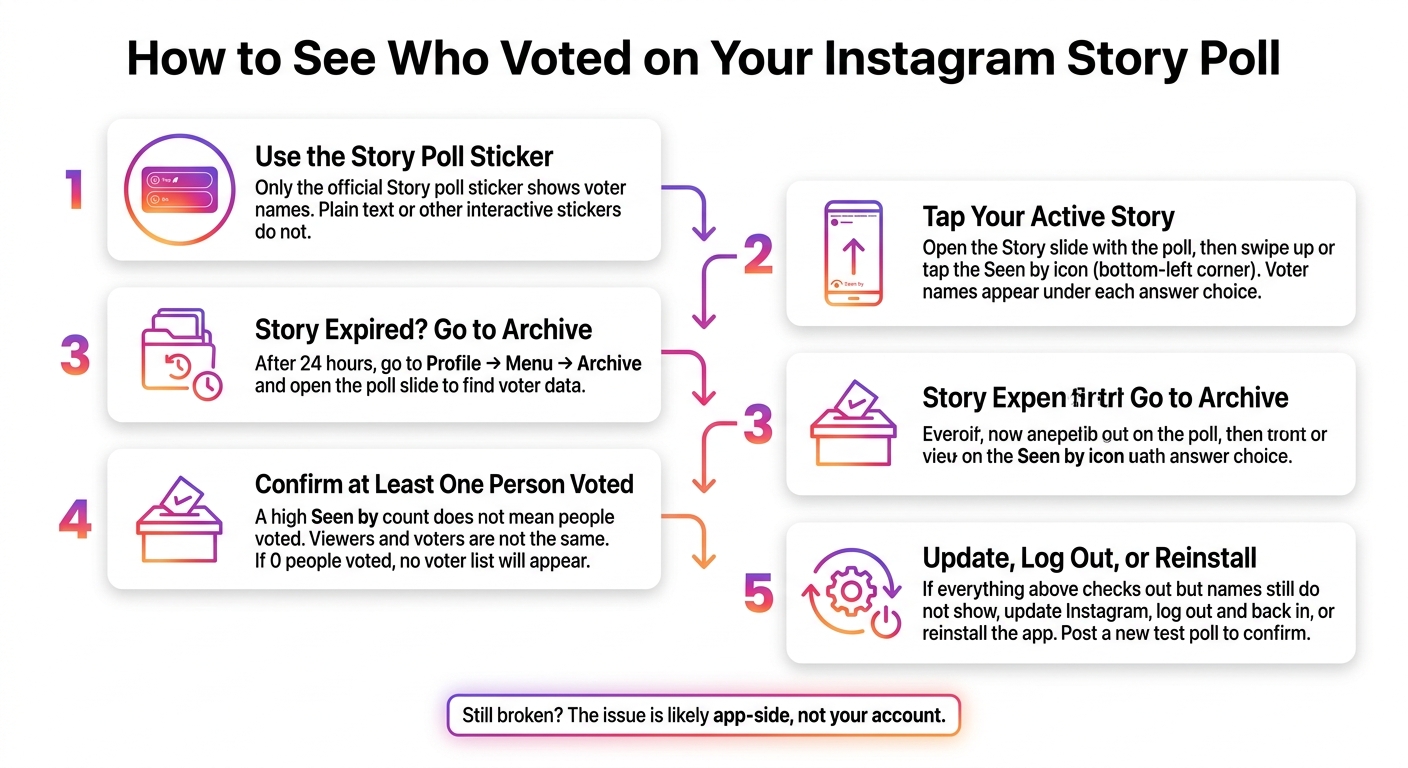
How to See Who Voted on Your Instagram Story Poll
Open your Story and find poll results the right way
If you used the right Story poll but still don't see names, start by checking the results screen. Tap Your Story at the top of your feed, then open the exact slide with the poll sticker. From there, swipe up or tap the Seen by icon in the bottom-left corner. Voter names should appear under each answer choice.
Check Story Archive and compare with another poll
If the Story is more than 24 hours old, the poll data should still be in Archive. Open your profile menu, tap Archive, and load the poll slide you want to check.
It also helps to compare that slide with an older poll that still shows names. If past polls show voter names but this one doesn't, that's a strong sign the problem is tied to that one Story, not your full account.
Update, reinstall, log back in, and post a new test poll
If Archive still doesn't show voter names, it's time to rule out a short-term app glitch. Reinstall the app, sign back in, and post a brand-new Story poll. Keep it simple, like a yes/no poll.
If names show up on the new poll but not on the old one, that points to a problem with the original Story only.
Conclusion: What to Do With Your Poll Data
Instagram can show you who voted, but that only happens when a few things match up: the poll type, the screen you open, the timing, and sometimes even the app’s current state. Other interactive stickers may show totals or percentages, but not voter names.
Once 24 hours pass, check Archive for the final results and voter details. If the names still don’t appear, there’s a good chance you’re dealing with a display glitch or an app problem, not a missing vote. Run through the checklist below before you treat it like a bug.
Quick checklist before you troubleshoot again
Before you assume something’s broken, go through these five checks in order:
- Confirm the poll type - Use a standard Story poll sticker.
- Open the right screen - Tap your active Story, then swipe up or tap the Seen by icon.
- Check the Archive - If the Story is more than 24 hours old, go to Profile > Menu > Archive.
- Verify at least one vote was cast.
- Treat it as a display issue - Update the app or log out and back in.
FAQs
Why can I only see poll percentages?
You’ll usually only see the poll percentages, because the detailed voter data expires. Instagram shows the names of individual voters only during the first 24 hours after the poll goes live.
Once that window passes, you’re left with the overall percentages. If you want to see who voted for each option, open your Story activity while the poll is still live or within that first 24-hour period.
Can anyone else see who voted?
No. Only the account owner who created the poll can see which users voted for each option. Other Story viewers can’t see who voted or how specific users responded.
The owner can check while the Story is active by swiping up or tapping the Seen by icon. After 24 hours, voter names are no longer available, and only the total percentages remain.
Do poll voter names disappear after 24 hours?
Yes. You can see who voted while your Story is live, but that full voter list is only there for 48 hours from the time the Story was posted.
After that, even if the Story is saved to Highlights, the names and each person’s choice disappear. At that point, you’ll usually just see the total votes or percentages.


