

AI helps me test Instagram captions with less guesswork. Instead of changing everything at once, I use AI to write a few caption versions, test one change at a time, and track what leads to more saves, comments, shares, profile visits, and reach-based engagement rate.
Here’s the short version:
- I pick one goal first, like saves, comments, or profile visits.
- I compare each post to a baseline from similar past posts.
- I keep the visual, topic, format, and audience as close as possible.
- I test only one caption variable per round, such as:
- hook
- caption length
- structure
- CTA
- tone
- I check results at the 24- to 48-hour mark.
- I use this formula for engagement rate: (Likes + Comments + Shares + Saves) ÷ Reach × 100
- I look for patterns across multiple posts, not one lucky result.
A few numbers matter here. The article notes that the average Instagram engagement rate in 2026 is about 0.5%. So if one caption style keeps beating that level across similar posts, I treat that as a useful signal.
The main idea is simple: AI can draft test versions fast, but I still need a clean test setup, clear tracking, and a human review before anything goes live.
If I want better caption data, I don’t need more guesses. I need a tighter test.
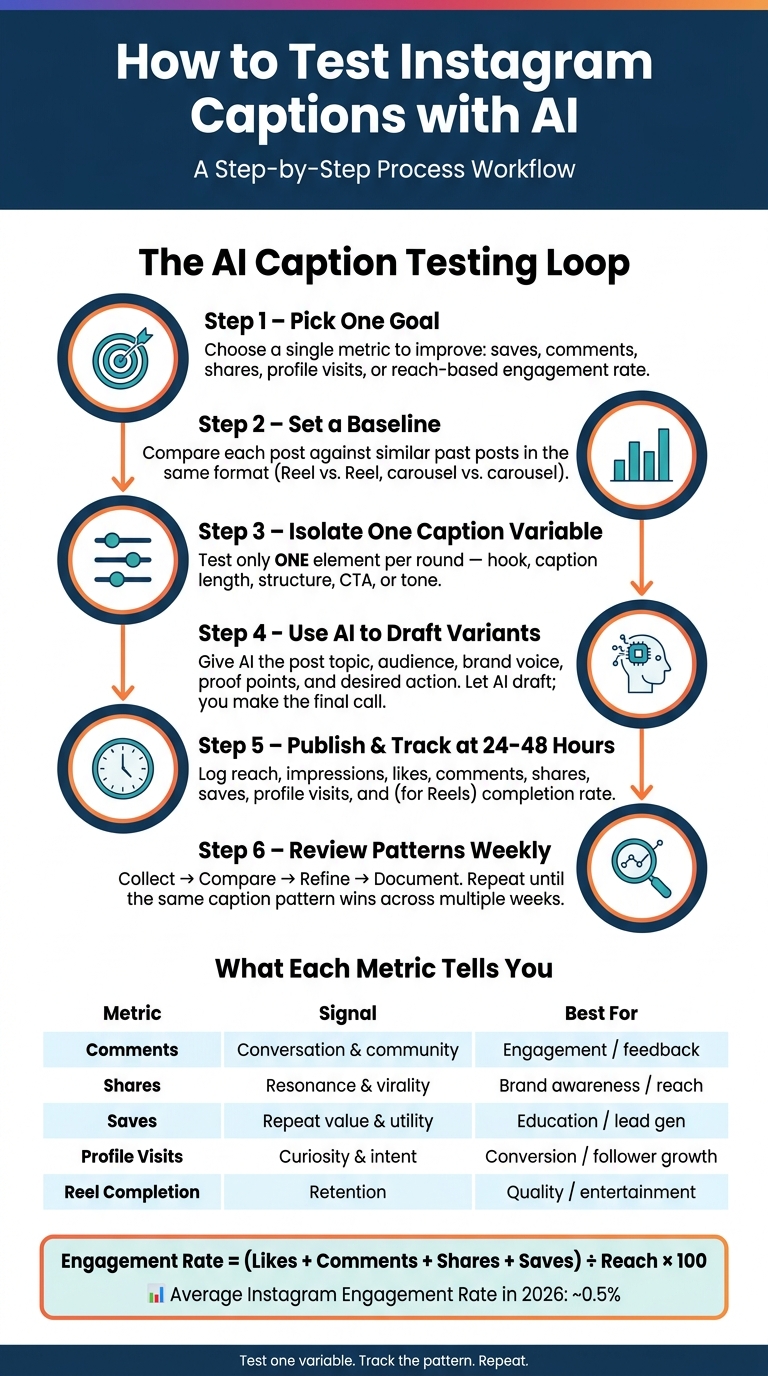
How to Test Instagram Captions with AI: A Step-by-Step Workflow
Create Controlled Caption Variants With AI
AI can spin up caption options fast. But speed alone doesn't help much if the test is messy.
What matters is control.
When each caption variant changes just one thing, you get cleaner data. That makes it much easier to see what improved saves, comments, or reach. Otherwise, you're not testing one factor. You're testing three or four at the same time, and the result gets muddy.
Test One Variable Per Caption Round
Each test round should isolate one caption element. The main ones to test are your hook, length, format, CTA, and tone.
Here’s what that can look like:
- Hook style: A question ("Struggling to get saves on your posts?") versus a direct statement ("Most creators skip this one caption step.")
- Length: Test a short caption against a mid-length caption.
- Structure: Benefit-led ("Here's what you'll get") versus process-led ("Here's how it works").
- CTA focus: Use one CTA type per round - save, comment, or link tap.
Keep the visual and topic the same across every variant. The only thing that should change is the caption element you're testing.
Give AI the Right Inputs and Review the Output
A vague prompt gives you vague captions. If you want test-ready variants, your prompt should include the post topic, target audience, brand voice, specific proof points, any banned phrases, and the exact action you want the reader to take.
Then keep the AI on a short leash: have it vary only the part of the caption you're testing. AI gives you options. You keep the test clean. Let the tool do the drafting, then make the final pick yourself.
Before any AI-written caption goes live, follow an Instagram post checklist for a final human check. Review:
- factual accuracy
- fit with brand voice
- mobile readability in the first line
- compliance with Instagram's policies
AI can help with volume and idea generation. The editorial call is still yours.
Next, group these tests by format so you compare like with like.
sbb-itb-3c55afb
Group Posts by Format and Build a Simple Test Design
Once AI gives you caption options, sort them by post format before anything goes live.
Instagram doesn't have a built-in organic caption test for organic captions, so the best move is a structured side-by-side comparison: publish similar posts in similar time windows, then compare the results directly.
Compare Similar Posts, Not Mixed Content
Keep each format and use case in its own lane. Test a Reel against a Reel, a carousel against a carousel, and so on.
| Post Type | Best Caption Length | Tone | Caption Pattern |
|---|---|---|---|
| Reel | Short to medium | Conversational or instructional | Hook-first |
| Carousel | Medium | Instructional | List-driven |
| Static feed photo | Medium to long | Storytelling or conversational | Context-first |
After that, log each post within the same format so the numbers are easier to compare.
Try to keep the visual, topic, and publish time as close as possible across variants. The caption angle should be the only thing you change. If you switch the image, topic, and posting time all at once, it's hard to tell what actually moved the result.
Use a Repeatable Tracking Sheet for Every Post
Give every post in the test its own row in a tracking sheet. Record the caption framework, variant label, hook type, caption length, CTA type, and publish date and time.
For metrics, track:
- Reach
- Impressions
- Likes
- Comments
- Shares
- Saves
- Profile visits
- Link clicks, when available
For Reels, also log views and completion rate. Track follower change too.
Use the same sheet each time you compare variants within a format.
Compare Engagement Signals Over Time
Once your tracking sheet has enough post data, look for the pattern behind the numbers, not just the biggest total. A single high number can point you in the wrong direction. What matters is what each metric says about the caption.
Read Each Metric for What It Means
Each metric tells you something different about the caption choice. Comments show whether the caption got people talking. Shares tell you the message landed well enough for someone to send it to another person, which makes them useful for awareness-focused captions. Saves show repeat value, so they help a lot when you're judging educational or utility-driven caption angles. Profile visits point to curiosity or intent, which matters when the goal is follower growth. For Reels, completion rate shows whether the hook and caption kept attention all the way through.
| Metric | Signal | Best for |
|---|---|---|
| Comments | Conversation & community | Engagement / feedback |
| Shares | Resonance & virality | Brand awareness / reach |
| Saves | Repeat value & utility | Education / lead gen |
| Profile visits | Curiosity & intent | Conversion / follower growth |
| Reel completion | Retention | Quality / entertainment |
Raw totals still matter. Just use them to judge scale, not performance.
Use Reach-Based Engagement Rate at Fixed Checkpoints
Compare posts only after they've had the same amount of time to settle. If one post has had 48 hours and another has had 12, the comparison isn't clean. Timing matters more than many people think.
(Likes + Comments + Shares + Saves) ÷ Reach × 100
For context, the average Instagram engagement rate in 2026 is about 0.5%. If one caption variant keeps beating that mark across similar posts, that's a signal worth watching.
Check each post at the 24 to 48 hour mark, then come back to the data in weekly or monthly pattern reviews. One strong post doesn't give you a winner. Small samples give direction, not proof. Use the pattern to decide which caption variable to test next.
Turn Caption Testing Into a Repeatable Workflow
Take those test results and turn them into a weekly review habit. The goal is simple: collect the numbers, compare similar posts, and adjust the next prompt.
Use a Simple Collect-to-Refine Process
Keep the review light so each week leads to one clear call: repeat, revise, or discard.
Use a four-step loop: collect, compare, refine, document.
- Collect: Export your weekly Instagram Insights and log each post with its date, format, hook type, caption length, CTA style, reach, saves, shares, and net follower change.
- Compare: Compare only the same format. Keep topic, format, and timing steady so you're looking at like-for-like posts. Use non-follower reach for discovery posts and saves per impression for educational posts.
- Refine: Adjust prompts when the same miss shows up across similar posts. Before publishing, run a quick check for hook strength, keyword placement, CTA clarity, tone match, and length fit.
- Document: Update the prompt library with accepted and rejected examples so the workflow gets easier to repeat.
Track Account-Level Growth Alongside Post Results
Use post-level results to guide caption choices. Then look at account-level trends to check the bigger picture.
Caption engagement and follower growth aren't the same thing, but they belong in the same review. Use account-level analytics alongside Instagram Insights to watch essential Instagram metrics and broader account movement. A post that keeps pulling in saves and shares can help follower growth over time.
Keep running the loop until the same caption pattern wins across multiple weeks. That's when AI-assisted caption testing starts to pay off.
FAQs
How many posts should I test before picking a winner?
Don’t judge a test by post count alone. What matters is statistical significance.
A good target is 1,000–5,000 impressions per variant. If your account is smaller and that’s tough to hit, use 50–100 meaningful engagements per variation instead. For conversion-focused tests, aim for 20–50 conversions per variation.
Whatever metric you use, don’t call a winner too early. Wait until the test reaches a 95% confidence level.
What should I do if one caption gets more reach but fewer saves?
Make saves your main success metric. The original guidance treats saves and shares as stronger signals of long-term value than reach.
Start with your main goal. If you want community or growth, pick the caption with more saves, even if reach is lower.
Then dig into your analytics dashboard and compare a few things:
- the hook
- the call to action
- the caption length
That helps you spot why the higher-reach caption got views but didn't turn those viewers into savers.
Can I use the same AI caption test process for Reels and carousels?
Yes. The same AI-driven testing process works for both.
Start with a clear goal, write a few caption options, publish the strongest one, and then check engagement, saves, and shares.
The main tweak comes down to format. Reels often do best with short captions, usually around 100 to 200 characters. Educational carousels usually need more room, so longer, value-first captions in the 800 to 2,000 character range tend to fit better.
One rule matters more than anything else: test one variable at a time.


