

If your AI-made Instagram posts look polished but get weak watch time, low saves, and few profile visits, the fix is usually not more content. It’s a better system.
I’d sum up the article like this: pick one audience, tie each post to one goal, build short Reels with a fast hook, make the video feel native to Instagram, disclose paid or AI-made endorsements, and judge results by retention, saves, shares, profile visits, follows, and clicks. That’s what turns AI UGC from random output into posts that can do a job.
Here’s the short version:
- Start with one audience segment, not “everyone”
- Choose one main metric per post like saves, shares, reach, profile visits, or DMs
- Use 4–6 content buckets so posting does not turn random
- Keep Reels around 15–30 seconds with a hook → proof → close
- Change visuals every 1–2 seconds to help hold attention
- Use one CTA only
- Format for mobile first in 1080 × 1920
- Keep text short and out of Instagram UI zones
- Watch completion rate and average watch time
- Test one variable at a time across 3–5 posts per version
- Scale formats that beat your baseline by 1.5x–2x
A few numbers stand out. For short Reels under 10 seconds, a 55%–100% completion rate is a good target. For 15–30 second Reels, 35%–60%+ is a solid range. And for many brands, posting 3–5 times per week tends to beat posting only once or twice.
What I like about this framework is that it treats AI as a production tool, not the plan itself. The plan is still audience fit, structure, visual choices, clean disclosure, and testing.
If I were putting this into practice today, I’d do this first:
| Step | What I’d focus on | What I’d track |
|---|---|---|
| Audience | One clear segment with shared interests and intent | Profile visits, follow rate |
| Goal | One outcome per post | Saves, shares, reach, clicks, or DMs |
| Content plan | 4–6 repeatable post types | Output by bucket |
| Reel build | Hook in 0–3 seconds, proof in the middle, one close | Watch time, retention drop-off |
| Visual setup | Native-looking vertical video with readable text | Scroll-stop and completion rate |
| Testing | One change at a time | Which version beats baseline |
In other words: AI can help you make more Instagram UGC, but the posts still need to look right, sound right, and push one clear action. That’s the core idea behind the full article.
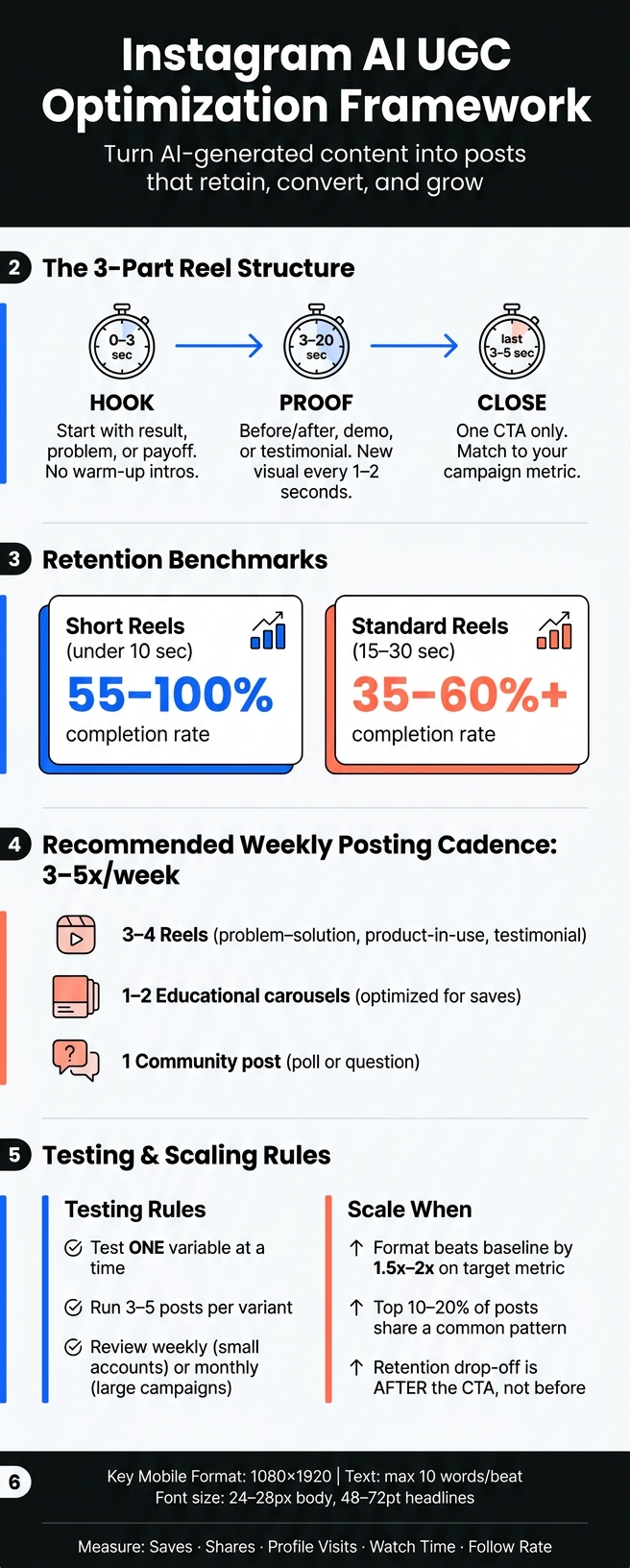
Instagram AI UGC Optimization Framework: Hook, Proof, Close System
Set Your Audience, Goals, and AI UGC Content Plan
Turn your audience and metric into a simple content plan. If you skip this step, even polished AI UGC can drift into random posting that goes nowhere over time.
Choose Your Audience Segment and the Metric to Optimize
Build each campaign around one audience segment. Get specific with age range, location, interests, language, and purchase intent. For example, a U.S.-based skincare brand might target women ages 18–24 in Los Angeles and New York who care about cruelty-free skincare and have engaged with competitor accounts in the last 30 days.
That level of detail shapes the whole campaign: tone, pacing, visual style, and even when you post. Use Instagram Insights to check peak activity times so your content lands when your audience is online.
Once your audience is set, match the campaign to one primary metric. This keeps testing clean and makes it easier to see what’s working.
| Campaign Goal | Primary Metric | Content Type That Fits |
|---|---|---|
| Awareness | Reach / Reels plays | Trend-based hooks, striking openers |
| Education | Saves | How-to Reels, step-by-step carousels |
| Social proof | Shares / Comments | Testimonial-style, relatable stories |
| Discovery | Profile visits | Curiosity-driven hooks, strong captions |
| Conversion | Link clicks / DMs | Clear offers, direct CTAs |
Build Content Buckets and a weekly posting workflow
After you’ve set the audience and metric, build repeatable content buckets around them. A good rule is to create 4–6 repeatable content buckets before you write a single script. For many U.S. brands, that includes problem–solution, before-and-after, product-in-use, testimonial-style, and quick education.
Each bucket should connect to one main metric. That makes briefing AI tools much easier and cuts down on back-and-forth.
For posting cadence, 3–5 posts per week often beat 1–2. A simple weekly setup could be:
- Three to four Reels during the week, such as problem–solution, product-in-use, and testimonial content
- One to two educational carousels aimed at saves
- One community post, like a question or poll
Batching helps a lot here. Write scripts in one session, handle editing in the next, then finish captions and scheduling last. It keeps production moving without turning your workflow into a mess.
Create Reusable Inputs for Faster Production
If you want to scale AI UGC and still keep your brand voice steady, build a reusable input library. Include brand voice notes, approved product claims, hook templates, visual references, caption structures, and CTA options.
That way, you’re not briefing AI from zero every time. You can pull from the library and plug in campaign details as needed.
Hook templates are one of the easiest wins to save. Lines like If you [do X], you need this or 3 mistakes you're making with [topic] can work again and again with a few audience-specific edits.
Pre-approved product claims help too. Phrases like dermatologist-tested or suitable for sensitive skin keep your content compliant without slowing your team down.
UpGrow supports this workflow with AI targeting, a viral content library, and real-time analytics that show which content buckets drive the most reach and engagement.
With your audience, goals, and inputs set, the next step is turning each bucket into Reels built for retention and action.
sbb-itb-3c55afb
Optimize AI UGC Reels for Retention and Action
Reels are one of Instagram’s main discovery formats, and the recommendation system can push them far beyond your follower base into Explore and the Reels feed. That’s a big deal for AI UGC. New viewers often decide in a split second whether to stay or swipe, so the Reel needs a job from the start. Use the metric from your content plan to decide what that Reel is supposed to do. Then build the Reel around that goal.
Use a Simple Reel Structure: Hook, Proof, Close
A simple three-part format works well: hook, proof, close. For most Reels, aim for 15 to 30 seconds.
The hook is the first 0 to 3 seconds. Start with the result, the problem, or the payoff, not a warm-up intro. On-screen text like Stop wasting money on IG ads over a close-up talking head works because it creates tension right away. The viewer needs a reason to pause, and that reason has to hit fast.
The proof takes up the middle, usually from second 3 to around second 20. This is where you show evidence people can believe: a before-and-after, a quick product demo, or a short testimonial that sounds natural. Keep things moving. A new visual or text beat every 1 to 2 seconds helps hold attention. Text overlays can also help people keep up without relying only on audio.
The close is the last 3 to 5 seconds. Use one CTA. Put it in the spoken audio, on-screen text, and the caption. Keep the ask tied to your campaign metric so the viewer has one clear next step.
| Reel Structure | Best Use Case | Retention Strength | Ideal CTA |
|---|---|---|---|
| Hook → proof → CTA | Educational, product demo, testimonial-style AI UGC | Strong - payoff is immediate and the viewer has a clear reason to stay | Save, comment keyword, visit profile |
| Problem → tension → solution | Pain-point content, before/after, transformation stories | Very strong for curiosity and completion | Comment, share, DM keyword |
| Result first → process second | Fast-scrolling audiences and mobile-first viewing | Strongest for stopping the scroll early | Save, tap link in bio, follow for more |
| Story → lesson → CTA | Relatable UGC, founder-style content, narrative ads | Moderate to strong when the story is concise | Share, comment, follow |
| Tip list → summary CTA | Educational or checklist-style content | Strong for saves if the tips are actionable | Save this, bookmark, comment keyword |
Once the Reel keeps attention, the caption should push the next move.
Write Captions and CTAs That Match the Post Goal
Your caption should support the action you want from the Reel. The first line shows before someone taps more, so treat it like a second hook. Restate the main benefit in plain English, then use short paragraphs and line breaks so it’s easy to scan on a phone.
Match the CTA to the metric you picked earlier. If the goal is saves, use Save this for your next Reel batch. If the goal is shares, use Send this to a creator friend. For lead generation, keyword comment prompts like Comment GUIDE and I'll send you the full checklist in your DMs can pair a comment with a direct follow-up step.
If the goal is a profile visit or a follow, tie it to what comes next: Follow for weekly AI UGC structures and real performance breakdowns. If the goal is an off-platform conversion, make the next step feel easy and specific: Tap the link in my bio to see exactly how we used AI UGC to grow an Instagram account from 0 to 10,000 real followers.
Stick to one CTA per post. If you pile on asks, attention gets split and friction goes up. Pick the action that fits the metric for that content bucket, and make that the only ask.
After the CTA is in place, make the Reel feel native to Instagram.
Make AI-generated UGC look native and compliant
After the CTA, presentation does a lot of the heavy lifting. A Reel can say the right thing and still miss if it looks off. Native-looking visuals help people trust what they’re watching and make them less likely to swipe away.
Pick a visual style that fits the account and feels real
AI UGC works best when it looks human, not polished to death. Handheld framing, uneven lighting, simple rooms, and a conversational delivery usually feel more like something a real creator would post. That’s often the sweet spot.
Use casual brand styling if you want a cleaner look without making the video feel stiff. Save polished visuals for premium products, but even then, keep some human texture in the final result.
| Visual Style | Brand Fit | Perceived Authenticity | Best Content Use |
|---|---|---|---|
| Creator-native | Lifestyle, wellness, everyday consumer products | Very high - feels organic and unscripted | Testimonials, day-in-the-life, relatable pain points |
| Casual brand | DTC brands, apps, mid-market products | High - cleaner, but still relaxed and human | Product demos, educational tips, before/after |
| Polished | Beauty, fashion, premium tech | Moderate - can feel scripted if overdone | Launch announcements, aspirational content, brand awareness |
Brand guardrails should guide the work, not box it in. Set preferences for backgrounds, colors, tone, and recurring themes, but don’t force every Reel into the exact same mold. A repeatable system beats a feed full of copy-paste videos, and too much sameness can wear people out. Using free AI-powered Instagram tools can help generate fresh ideas and keep content varied.
A simple gut check helps: would a real creator post this without being pushed? If the answer is no, strip it back.
Once the style is locked, make sure the layout works on a phone screen.
Format AI UGC for Instagram on mobile screens
Every Reel should be shot and exported in 1080×1920 vertical format (9:16). For talking-head clips, frame the subject from about mid-chest up, and let them take up around 60% to 70% of the frame height.
Text has to be readable right away, especially in the first second. Keep faces and key text centered and out of Instagram’s UI danger zones: the top 14%, bottom 35%, and right 6%. For text size, use at least 24–28 px for body copy and 48–72 pt for headlines on a full 1080×1920 canvas. Keep on-screen text to 10 words or fewer per beat so people can read it in about 1.5 seconds.
Write in American English. Keep phrases short and direct. If the wording sounds stiff, formal, or overly literal, it’ll feel machine-made fast, and that can chip away at trust.
Preview every Reel on a phone before you post it.
Handle disclosure and branded content correctly
Native style helps with trust. Compliance protects it.
If a brand paid for the post, or there’s a material connection between the brand and the creator or account, use Instagram’s Paid Partnership label. If the endorser is AI-generated, add a clear synthetic-endorser disclosure as well. Platform AI labels do not replace FTC disclosure.
Steer clear of fake testimonials, claims about results that you can’t support, deceptive edits that change how the product appears, and AI personas presented as real people without disclosure. Transparency is required.
Measure performance, test variations, and scale what works
Once your AI UGC is live, the real work starts.
One viral post can feel great, but it doesn't tell you much on its own. What matters is steady patterns across a group of posts. Tie every result back to the audience, goal, Reel structure, visuals, and CTAs you set earlier. Those are the inputs the data helps you tune. And when you review performance, use the main metric you picked for that campaign as your filter for every post.
Track the Instagram metrics that matter most
Measure each post against the single goal you chose.
- For awareness, watch reach, impressions, and unique accounts reached.
- For engagement, focus on saves and shares, since those usually show the most intent.
- For follower growth, track profile visits, follows from the post, and follow rate (follows ÷ reach × 100).
- For conversions, watch link clicks, link click-through rate, product page views, and native conversion events like View Shop or Add to Cart when available.
For Reels, average watch time and retention graphs give you the clearest read on whether the structure is doing its job. You can estimate retention with:
average watch time ÷ video length × 100
For short Reels under 10 seconds, aim for 55–100% completion. For 15–30 second Reels, 35–60%+ completion is a solid target.
The drop-off points tell a story. If retention falls in the first few seconds, your hook or opening frame likely needs work. If people stay through the middle but leave before the CTA, the ending is probably too long or doesn't feel tied to the rest of the Reel.
Engagement rate across Reels is often calculated as:
(likes + comments + shares + saves) ÷ reach × 100
Once you can see what moved, the next step is simple: test the inputs that drove it.
Run a repeatable testing loop for hooks, visuals, and CTAs
Test one variable at a time. That could mean pain-point vs. curiosity hooks, animated vs. static subtitles, or follow vs. comment-keyword CTAs. Run each test across 3–5 posts per variant.
For smaller accounts, review results weekly. For larger campaigns, monthly reviews usually make more sense. Log each post by bucket, hook, visual style, and goal. Then look at the top 10–20% of posts based on your target metric, spot what they have in common, and build your next batch around those patterns.
When a format beats your baseline by 1.5–2x on the target metric, that's a good sign it's worth scaling.
Conclusion: Build a repeatable AI UGC system for Instagram growth
The system is a closed loop: define one audience and one goal, plan 3–5 content buckets, build each Reel with a hook–proof–close flow, keep visuals native, keep disclosures clean, and let analytics shape the next round of content decisions. Every testing cycle gives you a smarter batch to publish next.
UpGrow fits into this loop with AI targeting, real-time analytics, profile optimization, and Boost™ for scaling posts that already perform.
FAQs
How do I choose the right audience segment?
Start with a clear goal: awareness, engagement, or conversion. That choice shapes everything that comes next.
Then use U.S. location filters and narrow the audience by age, gender, and language so it lines up with your UGC format. If the audience fit is off, even strong content can fall flat.
From there, tighten your segments with interests, related hashtags, and engagement signals. Focus more on high-intent actions like saves, shares, and link clicks than on likes alone. Likes can look nice, but they don't always show real interest.
It's also smart to test two or three distinct segments instead of putting all your budget into one audience right away. That gives you a cleaner read on what’s working and where people are more likely to act.
If you want extra help, UpGrow can support this with AI-powered targeting and real-time analytics.
What should I test first in AI UGC Reels?
Start by testing the hook. You’ve got about 1.5 seconds to stop the scroll, so this part matters most if you want more people to watch your Reel.
Leave the rest of the script alone and change only the hook. Test 3 to 6 versions of the same script, each with a different hook style.
Once you find a hook that works, move on to other parts, like the angle, creator, tone, or CTA.
How can I tell if my Reel is actually working?
Look past likes. Pay attention to these signals instead:
- 3-second view rate: If you're above 25%, your hook and opening visuals are doing their job and stopping the scroll.
- Watch-time completion rate: Anything above 70% is a strong sign your video is holding attention.
- Saves, shares, and comments: These tell you more than likes ever will.
Use UpGrow’s dashboard to watch these trends in real time and tweak your strategy based on how your audience actually behaves.


