Instagram Automation: AI Safety Explained
Use API-based, OAuth-secured Instagram automation and respectful pacing to avoid action blocks, shadowbans, and account bans.
Use API-based, OAuth-secured Instagram automation and respectful pacing to avoid action blocks, shadowbans, and account bans.
4.98 /5 - from 58k reviews
Trusted by 50,000+ creators — get real engagement delivered to your profile in minutes, not days.

Instagram automation can save time, but unsafe practices risk your account. Here’s what you need to know:
Key takeaway: Use tools that operate within Instagram’s guidelines to protect your account and grow responsibly.
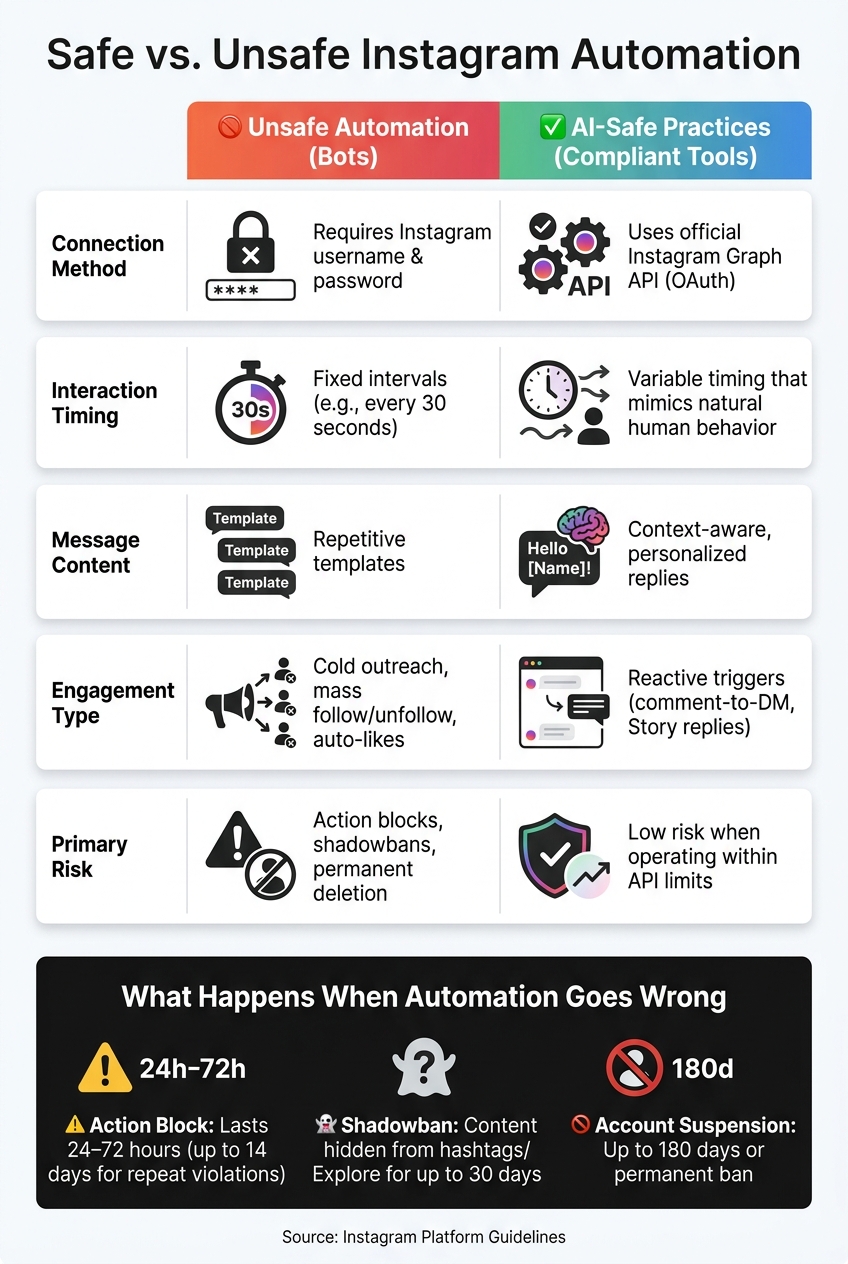
Safe vs. Unsafe Instagram Automation: Key Differences
Instagram has developed advanced systems to detect automation, and they go beyond spotting obvious spam. These systems analyze the rhythm of your activity. Think about how humans interact with the platform: we pause, scroll, and sometimes get distracted. Bots, however, tend to follow rigid schedules, like liking a post every 30 seconds without fail. This kind of mechanical consistency is a major red flag.
Instagram also keeps tabs on how much activity happens in a short time. For example, posting 40 comments in an hour or sending a flood of direct messages at once can get flagged. Additionally, the platform tracks your IP address and device usage. If your account logs in from New York and then London within the same hour, that’s suspicious. Similarly, activity that bypasses Instagram’s authentication process is another warning sign.
"Instagram, we suspect automated behavior on your account. To prevent your account from being temporarily or permanently disabled, please ensure that no other users or tools have access to your account." – Instagram System Warning
When Instagram detects unsafe automation, penalties follow - ranging from temporary blocks to permanent bans. The most common consequence is an action block, which prevents you from liking, commenting, or following others. These blocks usually last 24 to 72 hours, but repeated violations can extend this to 14 days. For more serious cases, Instagram may impose a shadowban. This means your content is still visible on your profile but won’t appear in hashtag searches or on the Explore feed, sometimes for up to 30 days. In extreme cases, accounts may be suspended or banned for as long as 180 days.
There’s also a hidden cost to unsafe automation: it can create a "hollow audience." Accounts that rely on bot-driven tactics like mass following and unfollowing often end up with inflated follower counts but very low engagement. Fake or disengaged followers simply don’t interact with your content, making your audience look strong on paper but weak in reality.
The table below highlights the differences between risky automation and safer, compliant practices. It’s a handy guide to understanding what behaviors Instagram tolerates and what it doesn’t.
| Feature | Unsafe Automation (Bots) | AI-Safe Practices (Compliant Tools) |
|---|---|---|
| Connection Method | Requires Instagram username and password | Uses official Instagram Graph API (OAuth) |
| Interaction Timing | Fixed intervals (e.g., every 30 seconds) | Variable timing that mimics natural human behavior |
| Message Content | Repetitive templates | Context-aware replies |
| Engagement Type | Cold outreach, mass follow/unfollow, auto-likes | Reactive triggers (comment-to-DM, Story replies) |
| Primary Risk | Action blocks, shadowbans, permanent deletion | Low risk when operating within API limits |
Rohan Rajpal from Spurnow offers a simple rule of thumb:
"Never automate something that a genuine person on Instagram wouldn't realistically be doing. When in doubt, err on the side of caution and stay within normal human-like limits."
The key takeaway? Unsafe automation tries to imitate human behavior but fails to do so convincingly. Compliant AI tools, on the other hand, work within Instagram’s official systems and only engage when a real user initiates interaction.
Compliant tools are built with Instagram's official APIs and include technical measures to keep your account secure. For instance, they rely on the official Graph API and use OAuth protocols to safeguard your login credentials.
Another critical factor is how these tools operate. They respect Instagram's rate limits - for example, most accounts can send about 50 comment-triggered DMs per hour, while newer accounts are limited to around 15. To avoid detection, compliant tools use intelligent pacing, which mimics natural human behavior by varying the timing of actions instead of sticking to rigid intervals. On top of that, advanced tools create unique, personalized responses to avoid triggering spam filters.
Here’s a quick breakdown of these safety measures:
| Safeguard | What It Does |
|---|---|
| Official Graph API | Connects securely without scraping or requiring passwords |
| OAuth Authentication | Protects your credentials using secure tokens |
| Rate Limit Management | Stays within Instagram's hourly and daily action caps |
| Intelligent Pacing | Mimics natural human behavior with timing variations |
| Unique Content Generation | Prevents repetitive responses that could flag spam filters |
| Drip Delivery | Distributes engagement actions gradually over 7–30 days |
These safeguards are the foundation of platforms like UpGrow, ensuring your account remains safe and compliant.
UpGrow combines patented AI technology with human oversight to deliver Instagram-compliant engagement. By incorporating the safeguards above, UpGrow demonstrates a commitment to adhering to Instagram's strict guidelines.
One of its standout features, UpGrow Boost™, uses AI-driven pattern recognition to identify the best engagement opportunities while staying within Instagram’s rules. This approach has helped users achieve up to a 275% monthly increase in followers. With smart targeting filters - like location, age, gender, language, and interests - UpGrow ensures follower growth is both relevant and meaningful.
Since 2016, UpGrow has maintained Instagram compliance and earned a stellar 4.98/5 rating from over 58,980 reviews. Users frequently highlight the platform's ability to drive real, organic growth strategies.
"UpGrow has helped me take my e-commerce brand to the next level. This success was built on a solid Instagram marketing strategy. In just 3 months, we've gained over 20,000+ new followers - all potential customers!" – Jennifer Khan, E-commerce Brand Owner
Additionally, UpGrow provides a live analytics dashboard, giving users real-time insights to quickly spot and address any anomalies.
Ensuring account security and safeguarding data privacy are top priorities when using automation tools.
When connecting your Instagram account to an automation tool, the first thing you should check is whether the tool ever sees your password. With compliant tools, the answer is a resounding no. These tools use OAuth authentication, which redirects you to Instagram's official login page. Instead of storing your credentials, they generate a secure access token for authentication. This means the tool operates solely with the token, not your login details.
Why is this so important? Sanjay, Founder of InstantDM, explains:
"If the software gets hacked, your Instagram account is safe because they never had your login."
Beyond that, reputable tools take additional security measures. Access tokens are encrypted at rest, so even in the unlikely event of a server breach, the data remains unreadable. All communications between the tool and Instagram are secured using HTTPS, ensuring data is transmitted safely. Unlike browser extensions, which can expose users to local vulnerabilities, compliant tools operate on secure servers, providing an extra layer of protection.
A noteworthy update: Starting in 2026, Meta will enforce stricter OAuth scoping. This means apps will only be allowed to request the minimum permissions necessary to function. Plus, you can revoke any tool's access directly through your Instagram settings without having to reset your password.
Now, let’s dive into how these security practices tie into broader data privacy and compliance efforts.
Beyond login security, compliant automation tools adhere to rigorous data privacy standards. This includes how they handle activity data, such as follower interactions and analytics.
One key standard is GDPR compliance, which ensures user data is handled responsibly. For instance, hosting servers in locations like Frankfurt, Germany helps meet GDPR requirements by ensuring data remains localized. Companies like UpGrow also align their practices with Instagram’s compliance framework, ensuring their data handling policies meet platform standards.
Looking ahead to 2026, transparency will take center stage. Businesses using AI-driven features will be required to label these interactions with "Made with AI" notices, keeping users informed and maintaining trust.
Not every tool claiming to be "safe" truly is. Before connecting any automation service to your Instagram account, it’s crucial to take a closer look. Here’s how to ensure the tool you’re considering is secure.
To protect your account, follow these five key checks before using any automation tool:
Look for OAuth 2.0 authentication to keep your password private. If a tool asks directly for your Instagram password, that’s a big red flag. Next, determine whether the tool operates server-side or relies on browser extensions. Tools requiring browser extensions or open tabs often involve prohibited automation methods that Instagram’s systems can detect quickly.
Here’s a quick breakdown of what to look for:
| Safety Check | What to Look For | Warning Sign |
|---|---|---|
| Login method | OAuth 2.0 or an "Authorize" button | Requests your Instagram password |
| Operation method | Server-side only | Requires browser extensions or open tabs |
| Meta partnership | Listed in Meta Partner Directory | No verifiable partnership status |
| Outreach type | Trigger-based (user-initiated) | Promises cold DMs or mass mentions |
| Rate limiting | Built-in limits (e.g., 200 DMs/hour) | Advertises "unlimited" actions |
These checks help ensure the tool aligns with Instagram’s guidelines and doesn’t put your account at risk.
Another critical factor to evaluate is how the tool delivers growth. Tools that spread actions gradually over 7–30 days simulate organic activity and are far less likely to trigger Instagram’s detection systems. On the other hand, bulk delivery that causes sudden activity spikes is a clear warning sign.
UpGrow is a standout example of a safe and reliable automation tool. It doesn’t require your Instagram password, avoids browser extensions entirely, and operates securely via server-side infrastructure. Its AI-powered targeting focuses on filters like location, age, gender, and language, ensuring growth is meaningful and relevant - not just about numbers.
The platform also offers a 24/7 real-time monitoring dashboard, so you can watch your follower growth unfold without any guesswork. For anyone serious about scaling their Instagram presence safely, this combination of compliance, transparency, and smart targeting makes all the difference. You can further optimize your results by implementing AI-driven growth strategies alongside these safety protocols.
Instagram automation itself isn’t the problem - it’s all about how the tool operates. The fine line between growing your account and risking it all boils down to one key decision: whether the tool you’re using respects Instagram’s rules.
Tools that scrape data, mimic browser activities, or demand your password can put your account in danger. These unsafe practices might lead to penalties like reduced reach or, worse, account deletion. With over 60% of American brands now relying on some form of Instagram automation, choosing the right tool is more critical than ever.
This is why a thoughtful approach is essential.
"The most successful automation strategies focus on augmenting human creativity rather than replacing genuine interaction." - LinktoDM
Safe automation tools prioritize compliant practices. They use official APIs, secure login methods, and enforce rate limits to protect your account. These tools don’t just save you time - they help you grow responsibly by focusing on inbound, user-driven interactions. Making the right choice ensures long-term success.
To determine if a tool uses Instagram's official Graph API, look for an explicit statement that it relies on Meta-approved endpoints. This demonstrates transparency and adherence to Instagram’s standards. Also, check if the tool uses OAuth authentication and aligns with Instagram's API guidelines. These are strong signs of compliance and ensure the tool operates safely within Instagram's rules.
If Instagram displays an “automated behavior” warning, it’s crucial to immediately stop any automated actions and temporarily pause the use of automation tools. Stick to safe practices, such as limiting the frequency of automated activities and ensuring you're operating within Instagram’s guidelines by using official APIs. These steps can help safeguard your account from potential restrictions and promote safer use of automation features.
When linking a tool through OAuth, stick to permissions that align with Instagram’s official API, like messaging, posting, or accessing analytics. Steer clear of granting permissions for activities like scraping follower data or sending unsolicited messages - these practices can breach Instagram’s policies and put your account at risk. Only enable the permissions essential for the tool to operate securely and within Instagram’s rules.