
Table of contents
- Auto DM Anyone Who Comments on Instagram Post (Free)
- Setup Paths, Account Requirements, and Launch Steps
- How to Design a Compliant DM Funnel That People Actually Reply To
- Lead Routing, Metrics, and How DM Funnels Support Instagram Growth
- Conclusion: Build Useful, Measurable, and Policy-Aware Comment-to-DM Funnels
- FAQs

Instagram automation works best when you keep it simple: ask people to comment one keyword, send one DM tied to that comment, deliver the promised item first, and track what happens next. In 2026, the main rules are still clear: use a Business or Creator account, send the private reply within 7 days, and build the flow around the fact that you get one initial private reply per comment.
Here’s the short version:
- I’d use this flow when the post offers one clear payoff, like a guide, demo link, pricing info, or support path.
- I’d start with one post, one keyword, and one short public reply like “Sent - check your DMs.”
- I’d make the first DM do one job: deliver what the person asked for.
- I’d ask only one next-step question after that.
- I’d route replies into simple buckets like lead, support, or human handoff.
- I’d watch a few numbers first: DM delivery rate, reply rate, qualification rate, conversion rate, and opt-out rate.
There are also 3 main setup options: native Meta tools, the Instagram Messaging API, or a Meta-approved automation platform. My rule is simple: pick the lightest setup that covers your routing, inbox, and reporting needs.
If I had to reduce the whole article to one sentence, it would be this: the post promise and the DM must match exactly. That’s what keeps the flow useful, policy-aware, and more likely to get replies.
Auto DM Anyone Who Comments on Instagram Post (Free)
sbb-itb-3c55afb
Setup Paths, Account Requirements, and Launch Steps
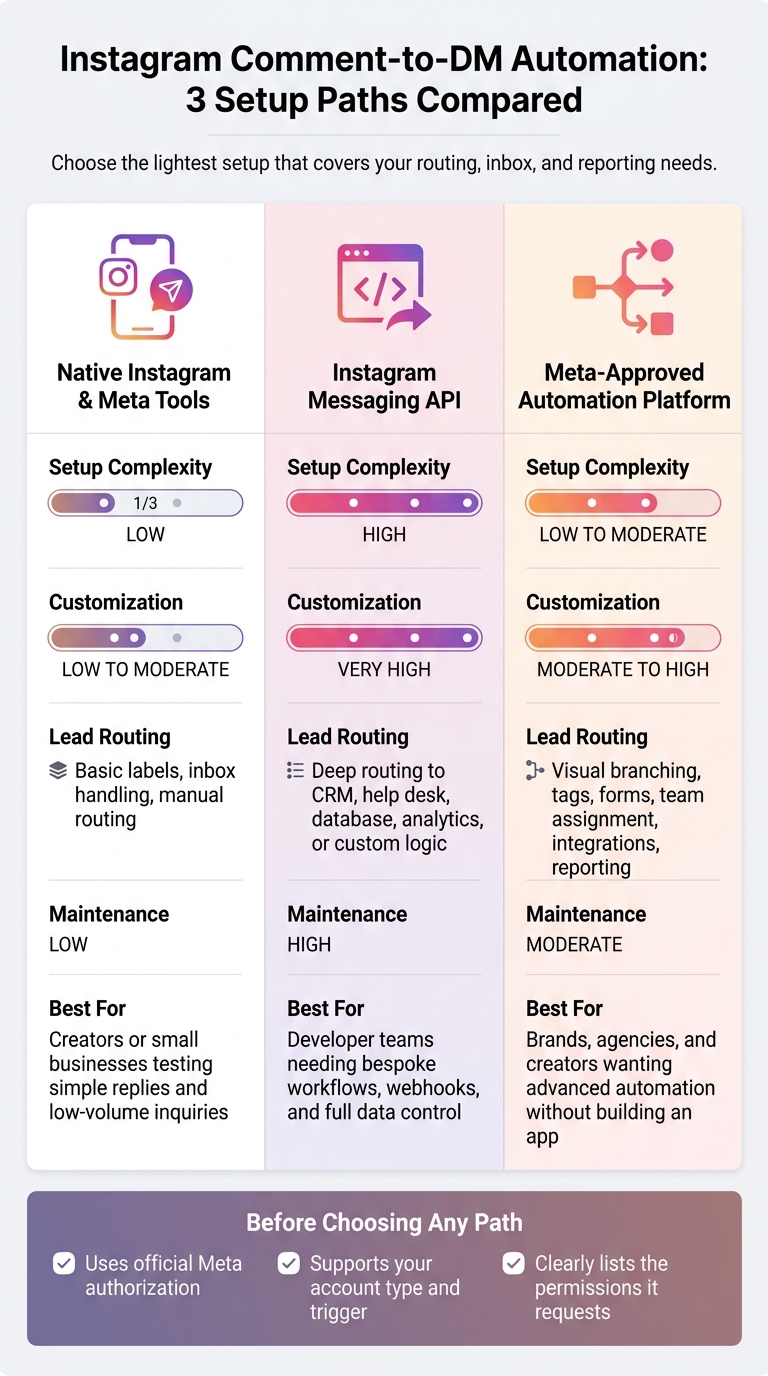
Instagram Comment-to-DM Automation: 3 Setup Paths Compared
Account requirements and permissions to check before you start
First, make sure the account is Professional - either Business or Creator. Personal accounts can't use the Instagram Messaging API. Also check that the owner or admin can approve the connected tool and has access to the Instagram profile and any linked Meta Business assets. If those pieces aren't in place, private replies may not work at all.
You should also confirm that message access is turned on and that the connected tool has permission to send private replies. One more detail matters here: some setup paths need a linked Facebook Page, and some may not. The Messenger Platform route usually does, while the newer Instagram Login route may not. And this part is worth being strict about: use Meta's official authorization flow, not a tool that asks for your Instagram password.
3 setup paths: native tools, Instagram Messaging API, or a Meta-approved automation platform
Pick the route that fits your team's skill level and how much routing you need.
| Setup path | Setup complexity | Customization | Lead-routing capability | Maintenance | Ideal use case |
|---|---|---|---|---|---|
| Native Instagram and Meta tools | Low | Low to moderate | Basic labels, inbox handling, and manual routing | Low, but feature availability can change | A creator or small business using an Instagram growth service to test simple replies and low-volume inquiries |
| Instagram Messaging API | High | Very high | Deep routing to a CRM, help desk, database, analytics system, or custom logic | High | Teams with developers that need bespoke workflows, webhooks, and data control |
| Meta-approved automation platform | Low to moderate | Moderate to high | Visual branching, tags, forms, team assignment, integrations, and reporting | Moderate | Brands, agencies, and creators that want advanced automation without building an app |
The simplest path is often the best one - as long as it covers your routing, CRM, and reporting needs. A small team usually doesn't need to build a full custom app on day one. But if you need webhooks, custom logic, or tight system control, the API route may make more sense.
Before you commit to any platform, check three things:
- It uses official Meta authorization
- It supports your account type and trigger
- It clearly lists the permissions it requests
A launch checklist for your first live flow
Start small. Use one trigger and one keyword first, then add more after the first test works. Here's the cleanest way to roll it out.
1. Connect the account
Use the official Meta flow or an approved platform authorization flow. Never type your Instagram password into a third-party tool.
2. Confirm permissions
Make sure permissions are granted and scoped the right way. For a custom Instagram Login integration, this often includes instagram_business_basic and instagram_business_manage_messages, plus comment-management access when needed.
3. Choose a narrow trigger
Pick one specific post or Reel. If you're stuck, use an AI Instagram post ideas tool to generate high-engagement concepts. Then set one or two clear keywords, such as "GUIDE" or "PRICE."
4. Write one short public reply
Keep it simple. The reply should confirm that the DM was sent.
5. Open with the promised resource
Send the thing the person asked for first, then ask for one next step. That keeps the flow clear and cuts friction.
6. Add buttons and qualification logic
Use options like "Get the guide," "Talk to support," or "Request a quote." Then apply tags based on what the person selects.
7. Test with a non-admin account
This step matters more than people think. Comment from a separate Instagram account and check keyword matching, the public reply, DM delivery, link behavior, button actions, duplicate-comment handling, and human escalation.
8. Monitor closely after launch
Watch comment-event receipt, DM delivery, failed permissions, duplicate sends, and human handoffs during the first live window. Set alerts for authentication errors or webhook delays. Log the timestamp, content ID, comment ID, account used, and the exact error so you can reproduce failures.
Private replies use the comment ID, so log it for every failed send.
How to Design a Compliant DM Funnel That People Actually Reply To
After setup, the next job is to shape the DM flow so it's compliant, relevant, and easy to answer. The best funnels do two things well: they deliver the promised value fast, and they ask for just one next step.
Compliance checks to run before you go live
Before launch, check the rules first. A private reply is limited: you can send one initial DM tied to the comment, and you need to send it within the allowed window. Build the funnel around that first message. After that first reply, the person usually needs to respond or re-engage before you can keep going under the standard 24-hour messaging window.
Also, check Meta's current documentation right before you go live. Permissions, message windows, rate limits, and eligible entry points can shift.
From there, keep the flow simple and put value first.
| Compliance check | What to confirm |
|---|---|
| Account and integration | Authorized integration with correct permissions |
| Trigger relevance | The DM is directly tied to the specific comment, post, or offer that triggered it |
| Private-reply limit | The workflow assumes only one initial private reply per comment |
| Timing | Replies are sent only within currently permitted windows |
| Message quality | Messages are short, non-repetitive, and limited to one action |
| Human escalation | Support questions, sensitive topics, and high-intent leads can reach a real person |
| Opt-out handling | "Stop", "unsubscribe", and similar phrases suppress future promotional messages immediately |
| Fallbacks | Unexpected replies, invalid buttons, duplicates, and expired windows all have defined responses |
| Documentation review | Team has checked the latest Meta documentation immediately before launch |
The recommended funnel stages: confirmation, value delivery, qualification, routing, and stop conditions
Think of the funnel as five clean stages. Each stage has one job.
Stage 1 - Confirmation: Tell them why they got the DM and connect it to the comment.
Stage 2 - Value delivery: Give them what they asked for right away - the guide, the discount, the answer. Don't send them through two extra screens first. That's where people drop off.
Stage 3 - Permission to ask more: Ask before sending any follow-up: "Would you like a quick recommendation based on your situation?"
Stage 4 - Qualification: Ask one question only. "Are you managing this for yourself or for a team?" gives you more than a five-field form in most cases. Then route the answer to the right path: nurture, support, or a sales handoff.
Stage 5 - Routing and stop conditions: Stop when the person says no, asks for a human, or goes inactive. Use one neutral fallback: "Were you looking for the guide, pricing, or help with an existing order?"
Message templates for resource delivery, support, and sales handoff
These short templates work well as a default structure for each stage. Keep each message focused on one action. And use button labels that say what happens next - "Get the checklist" is much better than "Continue."
Confirmation + resource delivery:
"Hi {{first_name}} - thanks for commenting 'PLAN.' Here's an Instagram content calendar and planner: {{link}}. Reply QUESTIONS if you'd like help using it."
Permission to ask more:
"Would you like a recommendation based on your account? Reply YES or NO."
One-question qualification:
"What are you trying to improve most: reach, leads, or sales?"
Support routing:
"I can connect you with support. Is your question about setup, billing, or a technical issue?"
Human sales handoff:
"Thanks - that helps. I'm sending this to a team member who can recommend the best option. Please expect a reply in this Instagram chat during business hours."
Skip urgency, repeated links, unsupported claims, and requests for sensitive data. If one of those issues comes up, move it outside Instagram DMs.
Once the message flow is tight, the next step is routing and measurement.
Lead Routing, Metrics, and How DM Funnels Support Instagram Growth
How to tag and route leads without overcomplicating the flow
Once your funnel is live, clean routing makes reporting much easier.
Tag each conversation by campaign, source post, keyword, intent, customer status, and location only if geography affects eligibility. If you want cleaner reporting, add a short lifecycle stage like new, qualified, human handoff, converted, or closed.
A simple way to handle the flow is this: capture context first, qualify second, escalate third.
Say someone comments PRICE on a pricing Reel. You can send the requested info, tag the conversation as product-launch / pricing-Reel / purchase-intent, and move it to a human inbox if they ask about availability, customization, or a high-value purchase. When that happens, tag it as human handoff and assign one owner. If the person is already a customer, send them to support instead of promo follow-up.
Store the details that matter:
- campaign
- post ID or URL
- comment text
- keyword
- timestamp
- opt-in status
- owner
- outcome
That record keeps follow-up steady and helps you avoid asking the same person the same question twice.
Those tags also make the next part much easier to read.
The KPIs that show whether your funnel is working
Read these metrics like a chain. If one link drops, it usually points to a clear fix.
| KPI | Calculation | What it signals |
|---|---|---|
| Comment trigger rate | Triggering comments ÷ eligible reach × 100 | CTA is unclear or the incentive is weak |
| DM delivery rate | Delivered DMs ÷ triggering comments × 100 | Check permissions, rate limits, or API eligibility |
| Reply rate | Conversations with a reply ÷ delivered DMs × 100 | Opening message feels generic or doesn't deliver value fast enough |
| Qualification rate | Qualified leads ÷ conversations with a reply × 100 | Content attracts the wrong audience or qualifying questions are off |
| Click-through rate | Link clicks ÷ delivered DMs × 100 | Offer or CTA doesn't match the conversation |
| Lead conversion rate | Converted leads ÷ qualified leads × 100 | Sales or booking experience needs work |
| Human handoff rate | Human-routed conversations ÷ conversations with a reply × 100 | Automation is handling too many complex cases |
| Opt-out rate | Opt-outs ÷ delivered DMs × 100 | Messages are too frequent, off-topic, or hard to stop |
| Follower conversion rate | New followers attributed to the campaign ÷ unique commenters in the DM flow × 100 | Profile doesn't give people a clear reason to follow |
You can track the funnel from public engagement all the way to business outcome. But your own baseline and downstream results will tell you more than any published benchmark.
Set attribution windows before launch. For example, count a follow or purchase that happens within 7 days of the triggering comment. Then keep that formula the same from one reporting period to the next.
How comment-to-DM automation supports account growth when paired with strong content
A DM funnel does not create demand by itself.
What it does do is turn passive attention into an active, trackable signal. Someone who comments a keyword is showing more intent than someone who just scrolls by. That matters because it tells you which topics spark actual interest, not just impressions.
Over time, funnel conversion data can shape better content decisions. A Reel with fewer comments but a higher qualification rate can be worth more than a viral post packed with low-intent replies. When you judge posts by qualified leads, saves, follows, and downstream conversions, not just reach and likes, you get a much clearer view of what is doing the job.
After you deliver useful info, asking someone to follow for related content tends to work better than dropping a generic or unrelated ask. The automation can help move people forward, but it can't fix weak content, an unclear profile, poor offers, or bad targeting. Using free Instagram tools can help you refine your content and profile before scaling with automation. In those cases, the funnel may still work on paper while producing very few conversations that lead anywhere.
That’s why these signals matter so much: they show which posts, keywords, and offers deserve more of your attention.
Conclusion: Build Useful, Measurable, and Policy-Aware Comment-to-DM Funnels
The strongest comment-to-DM funnels in 2026 have one thing in common: they begin with something the user actually asked for. A person comments a keyword, gets exactly what was promised, and sees a clear next step. That's the model. Everything else - routing, tagging, metrics, and handoffs - is there to support that exchange.
From there, use the simplest setup that can handle it. Pick the path that fits your team's technical capacity and routing needs.
Before launch, check account eligibility, required permissions, and make sure a test comment-to-DM send works. Once the account is ready, keep the first reply tight and within Meta's limits.
Keep that first Instagram DM short. Acknowledge the comment, deliver the promised value, ask no more than one follow-up, and route the lead.
After the flow goes live, judge it by outcomes, not message volume.
Track funnel performance separately from follower growth. On one side, watch delivery, replies, qualified leads, handoffs, conversions, and opt-outs. On the other, watch reach, profile visits, follows, saves, shares, and return engagement. Those numbers should shape content decisions, not just sit in a report. Measurement shows whether the funnel is producing qualified conversations, not just sending messages.
The best results don't come from complicated flows. They come from clear calls to action, fast value delivery, and an obvious path to a human handoff. Check the flow on a regular basis and refine it based on real conversations.
FAQs
What happens if someone comments more than once?
If the same person comments more than once, don’t keep sending the same DM. Too many repeat messages can trip Instagram’s spam filters and, in some cases, lead to account limits.
A simple fix is to add a cooldown or rate limit, such as 12 to 24 hours. Also make sure your automation stays inside Meta’s 24-hour messaging window for automated replies. That way, your messages look more natural and are less likely to break platform rules.
How do I know when to hand a DM to a human?
Hand a DM to a human when the conversation gets too complex, sensitive, or high-stakes for automation.
That usually means things like customer complaints, negative feedback, or legal, medical, and financial questions. In those cases, people often need empathy, judgment, and a careful read of the situation, not just an automated reply.
You can set this up so the switch happens automatically. For example, trigger a manual handoff when the system spots negative keywords like scam or refund, or picks up signs of frustration.
It also helps to give people a simple backup option. A clear prompt like reply HUMAN makes it easy for users to ask for a person when they want one.
What should I fix first if my DM reply rate is low?
Start by looking at message quality and relevance. Generic, impersonal DMs get ignored all the time, so each message should line up with the user’s intent.
It also helps to keep your outreach from going stale. Rotate templates each week, check your targeting settings, and review chat transcripts and scripts every month to catch messages that just aren’t landing.


