

If Instagram link mapping is your main goal, I’d pick Later. If you just want low-cost scheduling across channels, I’d pick Buffer.
Here’s the short version: Buffer is built more for publishing across social platforms, while Later puts Instagram planning and link-in-bio mapping closer to the center. In this comparison, I’d look at bio link setup, post and Reel mapping, scheduling, analytics, integrations, and price. The article also points out a hard pricing split: Buffer starts at $6 per channel/month when billed monthly, while Later starts at $18.75/month billed annually for 8 profiles and 30 posts per profile.
- Choose Buffer if you want simple posting across Instagram, LinkedIn, X, Facebook, TikTok, or Pinterest.
- Choose Later if you want each Instagram post or Reel tied to its own page through a built-in Link in Bio tool.
- Choose based on workflow: Buffer is more channel-first; Later is more Instagram-first. Optimizing your social media workflow is key to scaling your presence.
- Watch the tradeoff: Buffer offers stronger post analytics, while Later makes feed-to-link mapping easier.
- For teams: both support collaboration, but lower Later tiers have tighter limits.
Quick Comparison
| Criteria | Buffer | Later |
|---|---|---|
| Best for | Multi-channel scheduling | Instagram-first link mapping |
| Bio link setup | Start Page, basic bio link use | Built-in Link in Bio on all plans |
| Link mapping | Simple post URL use | Feed and Reel mapping tied to URLs |
| Reels | Can schedule and publish | Can schedule and map URLs |
| Analytics | Clicks, reach, engagement, post data | Basic free analytics; less history on lower tiers |
| Platforms | Instagram, TikTok, LinkedIn, Facebook, X, Pinterest | Instagram, TikTok, Pinterest, YouTube, Facebook |
| Starting price | $6/channel/month billed monthly | $18.75/month billed annually |
If I had to sum it up in one line, it’s this: Buffer helps you publish; Later does a better job connecting Instagram content to the right link.
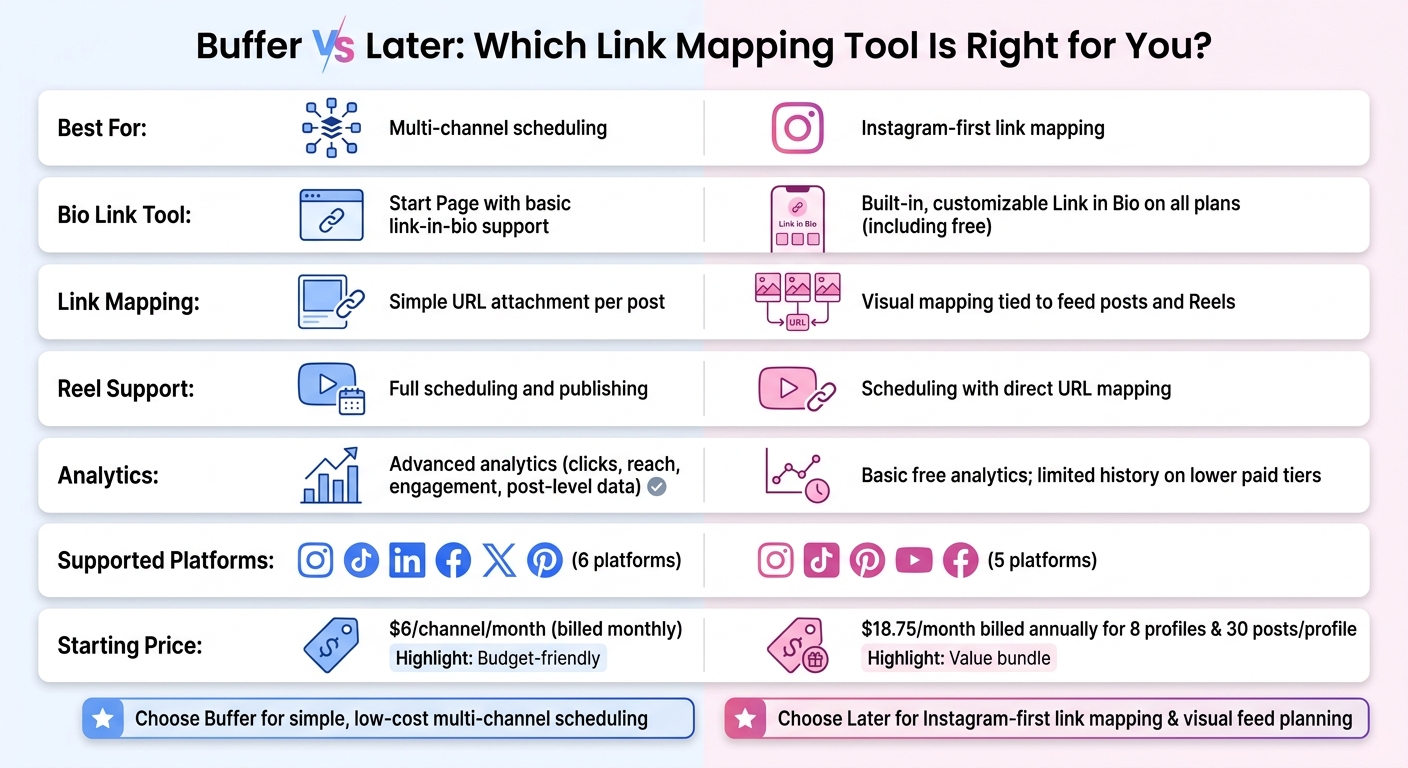
Buffer vs Later: Side-by-Side Feature & Pricing Comparison
Later vs Buffer: Which Social Media Scheduler Is Worth It? (2026)
sbb-itb-3c55afb
Buffer
Buffer connects to Instagram through official API integrations.
Bio Link Setup and Link Mapping for Posts and Reels
Buffer keeps link mapping pretty simple. Its bio-link tools are basic, so it works best when you want to send followers to one main destination instead of building a detailed feed-to-link path.
Scheduling, Analytics, and Integrations
Buffer uses a visual content calendar to manage posts across channels. This is a core part of effective Instagram marketing strategies for growing brands. It also includes first-comment scheduling, a built-in hashtag manager, and an AI Assistant that can suggest captions. If a post fails to publish, you may need to retry it manually.
The free plan has tight limits, while paid plans open up unlimited scheduling and deeper analytics. Buffer also tracks clicks, reach, engagement, and post-level breakdowns. That gives you a solid view of general post performance, but it doesn't separate clicks from mapped bio links on their own.
Buffer can schedule Reels, but Reels aren't the main part of its link-mapping flow. So while Buffer is efficient for publishing, it doesn't go very far for feed-linked Instagram paths.
Who Buffer Works Best For
Buffer is a good fit for solo creators and small teams that want simple scheduling and basic analytics without a built-in link-in-bio focus. If link mapping is your main goal, the next tool has a more built-in setup.
Later
Later takes a more built-in approach to link mapping than Buffer.
Link in Bio Setup and Instagram Mapping Workflow
Later's Link in Bio tool is available on every plan, including the free plan. When you schedule a post or Reel, you can attach the destination URL, and Later maps that link from the Link in Bio page so clicks go to the right page.
Scheduling, Analytics, and Media Organization
Later's visual feed planner lets you drag and drop content into a grid so you can preview your Instagram feed before anything goes live. Auto Publish works for both Instagram business and creator accounts, which means posts and Reels can publish without manual posting from your phone. Analytics on the free plan are basic, and historical data is limited on lower-tier paid plans.
Who Later Works Best For
Later works well for creators and brands that plan content around Instagram's visual format. It's a good fit for campaigns where each post needs to send people to a specific landing page, and the built-in link mapping cuts down on manual work. The free plan also includes basic collaboration. If you need deeper historical analytics or more advanced reporting, the lower tiers may feel limiting.
Later fits creators and brands that want link mapping built into Instagram planning.
Buffer vs Later: Side-by-Side Comparison
Bio Link Handling, Reel Support, and Analytics
The clearest gap between these two tools comes down to how you work. Buffer takes a broader scheduling approach, while Later leans hard into Instagram planning.
Buffer's Start Page gives you basic link-in-bio support inside a multi-channel scheduler. Later, on the other hand, puts its customizable Link in Bio tool at the center of the setup, with visual mapping for feed posts and Reels built right into the planning flow.
| Feature | Buffer | Later |
|---|---|---|
| Bio Link Tool | Start Page with basic link-in-bio support | Integrated, customizable Link in Bio page |
| Link Mapping | Simple URL attachment per post | Visual mapping to feed posts and Reels |
| Reel Support | Full scheduling and publishing | Scheduling with direct URL mapping |
| Analytics | Advanced analytics on Essentials | Introductory analytics on the free plan; limited history on lower paid tiers |
| Starting Price | $5/channel/month billed annually, or $6/channel/month billed monthly | $18.75/month billed annually for 8 profiles and 30 posts per profile |
If you just want to add a link to a post and move on, Buffer keeps things simple. If you care about how your Instagram grid, Reels, and bio link page connect, Later gives you a more visual setup.
Integrations, Workflow Style, and Team Collaboration
The difference goes past link mapping. It shows up in the day-to-day workflow too.
Buffer connects to Instagram, TikTok, LinkedIn, Facebook, X, and Pinterest, which makes it a strong pick if you run several platforms from one dashboard. Later supports Instagram, TikTok, Pinterest, YouTube, and Facebook, and its interface is built more for Instagram-first planning.
There’s also a gap in how each tool handles teamwork. Buffer includes team collaboration tools. Later uses access groups for media and contributors, with tighter limits on lower tiers. Buffer also comes with an ideas board and AI-assisted caption suggestions to help with drafting.
Which Tool Fits Which User
This split makes the choice a lot easier.
Buffer fits users who want a simple setup across several channels. If you're posting on Instagram along with LinkedIn or X, and you don't need a visual feed preview, Buffer keeps costs low (though you might still need ChatGPT for Instagram to optimize your strategy) with per-channel pricing. One channel on the Essentials plan costs $6/month when billed monthly.
Later fits creators and brands that put Instagram first. Its visual grid, link mapping, and Link in Bio page are built to work together as one system.
Final Verdict
The choice is pretty simple: pick Buffer if you want low-cost scheduling across a few social channels. Pick Later if your work centers on Instagram and you want link mapping built right into that flow. Later handles link mapping inside the same Instagram planning setup, which makes that part of the job easier.
Bottom Line for Creators, Brands, and Agencies
It mostly comes down to how you work day to day:
- Solo creators who want a simple, budget-friendly way to schedule posts across a handful of channels will usually be better off with Buffer.
- Small businesses that depend on Instagram traffic and want to boost their Instagram presence and want a dedicated link-in-bio page should go with Later.
- Agencies that need approval workflows and deeper reporting will probably outgrow both tools.
FAQs
Which tool is better for Instagram-first workflows?
For Instagram-first workflows, Later is the better fit.
It pairs Instagram-focused scheduling with Link in Bio, a visual drag-and-drop planner, Best Time to Post, and auto-publishing for Reels and Stories.
Put simply, it gives you a smoother end-to-end setup for publishing and tracking traffic than Buffer’s simpler analytics approach.
Can I map links to individual Reels and posts?
Yes, but usually not for every Reel or post by default. Link-in-bio tools mostly work as a central hub for multiple links.
If you want to send traffic from a specific post, the usual move is to point followers to your bio link, then update that landing page with the URLs that match your latest content.
How do pricing limits affect small teams?
Pricing limits can be a real headache for small teams. Free plans often cap usage at 10 to 30 posts per month and only support a small set of accounts. That makes steady daily posting much harder than it sounds.
The pressure tends to grow with the team. Entry-level plans may limit the number of social profiles you can connect, and some leave out team features like approval workflows. So teams often get stuck in an awkward spot: stay on a lower-cost plan that makes growth harder, or move up to a higher-priced tier just to get the team management tools they need.


