

Want the short answer? If I were picking fast, I’d sort these 7 tools like this: Writesonic for low-cost caption variations, Jasper for brand voice control, Flick for caption-plus-hashtag help, Predis.ai for free testing, Canva Magic Write for Canva users, Rytr for short drafts, and Hootsuite OwlyWriter AI for teams that also schedule posts.
A Reel caption tool should do 5 things well: write a strong first line, match your tone, suggest topic-based hashtags, rewrite versions for testing, and fit your budget and posting volume. That matters because Instagram users scroll fast, many watch with sound off, and the first 1–2 lines often decide whether someone keeps watching or moves on.
Here’s what this article covers in plain terms:
- Flick AI: caption + hashtag ideas tied to the Reel topic
- Predis.ai: builds the post, caption, and hashtags from one prompt
- Canva Magic Write: works inside Canva with tone options
- Jasper: strong brand voice settings for teams
- Rytr: short caption drafts and simple rewrites
- Hootsuite OwlyWriter AI: caption writing inside a scheduling tool
- Writesonic: multiple caption versions with brand voice and hashtag help
My quick take: most solo creators will likely lean toward Predis.ai, Rytr, or Writesonic. Small brand teams may look harder at Canva Magic Write, Writesonic, or Jasper. Agencies and social teams may care more about Jasper or Hootsuite OwlyWriter AI.
Quick Comparison
| Tool | Best Use | Tone Control | Hashtag Help | Rewrites | Free Option | Starting Price |
|---|---|---|---|---|---|---|
| Flick AI | Topic-based captions | Limited | Yes | Limited | Yes | Not listed |
| Predis.ai | Post + caption in one flow | Yes | Yes | Limited | Yes | Not listed |
| Canva Magic Write | Canva-based workflow | Yes | Yes | Yes | Yes | Canva Pro pricing |
| Jasper | Brand voice for teams | Yes | Limited | Yes | No | $39/month per seat |
| Rytr | Short draft captions | Limited | Limited | Yes | Yes | Not listed |
| Hootsuite OwlyWriter AI | Scheduling + captions | Paid tiers do more | Yes | Yes on paid plan | Yes | $49/month |
| Writesonic | Fast caption options | Yes | Yes | Yes | Trial | $20/month |
One pricing note stands out: published entry prices in this roundup run from $20/month for Writesonic to $59/month per seat for Jasper Pro, while several tools also offer free access or a trial. So if cost is your main filter, you can cut the list down fast before you test anything.
If I were choosing, I’d start with the tool that matches how I work already - not just the one with the most features.
How to Choose an Instagram Reel Caption Tool
Check these five features before you pick a Reel caption tool.
Hooks and calls to action
The first line needs to stop the scroll. Look for a tool that can open with curiosity, urgency, or direct language that speaks to your audience. It should also suggest a clear next move, like "comment below," "save this," or "click the link in bio." Tools made for engagement usually do both better than generic caption generators.
Tone presets and brand voice settings
Most good tools include tone options like casual, professional, witty, or sales-focused. If you're working with a brand, check for custom style guides or brand voice controls. That way, your captions stay consistent, even when several people on the team are writing them.
Hashtag suggestions for the Reel topic
Go with topic-based hashtag suggestions, not random generic lists. The best tools connect hashtag ideas to the actual Reel topic, which helps with discoverability.
Rewrite tools for testing versions
Pick a tool that can rephrase, shorten, and vary captions for testing. A/B testing a few versions of the same caption is one of the fastest ways to learn what gets more engagement on Reels.
Pricing, free plans, and posting volume
Your budget should match how often you post, how big your team is, and whether you need scheduling. Free plans work well for lighter use. Paid plans make more sense for frequent publishing. These filters make it easier to rank the seven tools below.
1. Flick AI Caption Generator
Flick generates topic-aware Reel captions and hashtag ideas. It works best when you want both at the same time, instead of jumping between separate tools.
Caption quality for Reels
Flick produces short, engagement-focused captions that stay tied to the Reel topic. Its main strength is that topic-based pairing, which helps the caption feel like it belongs with the post instead of sounding generic.
Hashtag support
Hashtag suggestions stay tied to the Reel topic.
Pricing and free plan
Flick offers a free AI caption generator.
Best fit by user type
Flick is a good fit for creators and social media managers who need fast caption drafts and consistent messaging.
2. Predis.ai
Predis.ai is a good pick if you want the caption to match the Reel from the start. Instead of writing copy as a separate step, it takes a broader, automated route. You give it one text prompt, and it generates the Reel caption and hashtags along with the post, so everything stays connected in the same workflow.
Caption quality for Reels
Because Predis.ai builds the visual and the caption together, the writing tends to stay in sync with what the Reel is about. That matters more than it sounds. A caption that feels tied to the actual video usually reads better and makes the post feel less pieced together.
It also adds hooks and calls to action, which helps if you want a more complete caption instead of a one-line description.
Tone and brand voice options
You can pick from tone presets like Professional, Casual, Witty, and Persuasive. If presets feel too generic, you can also set a custom brand voice using brand descriptions and assets, which gives you more control over how the copy sounds.
Pricing and free plan
Predis.ai offers a Free Forever plan. That's a nice starting point if you're new to Reel creation and don't want to spend money right away.
Best fit by user type
Predis.ai works well for:
- Solo creators who want to test a free plan first
- Brands that need captions, hashtags, and visuals to line up in one workflow
3. Canva Magic Write
Canva Magic Write lives inside Canva, so you can write Reel captions without leaving your design workflow. If your captions usually start in the editor, that setup just makes life easier.
Caption quality for Reels
Magic Write can generate Reel captions, hooks, and hashtags from a clear prompt. You can also reuse the same prompt to try a shorter version, a more casual version, or something with a stronger promo angle.
Tone and brand voice options
Magic Write includes tone presets like Professional, Friendly, Fun, and Inspiring. It also links with Canva's Brand Hub, which lets you apply custom brand voice settings.
Pricing and free plan
If your team already uses Canva, the big question is simple: is the free version enough, or does Pro make more sense? Canva's free plan gives you limited access to Magic Write, while Canva Pro opens up Brand Hub voice settings.
Best fit by user type
Best for creators and small brands already doing their design work in Canva.
4. Jasper
If your team needs tighter brand control than Canva gives you, Jasper is the next step up.
It’s built for professional content teams and turns out polished Reel captions.
Caption quality for Reels
Jasper adjusts to the Reel’s topic and goal instead of just echoing the keywords you type in. It can shape the caption around the Reel’s theme, campaign angle, hook, or CTA.
Tone and brand voice options
Jasper includes Brand Voice settings. Creator comes with 1 Brand Voice, Pro includes 3, and Business adds Custom Style Guides.
Hashtag support
Jasper doesn’t have a dedicated hashtag generator. Instead, it leans on keyword optimization.
Pricing and free plan
There’s no free plan. Pricing starts at $39/month per seat for Creator, $59/month per seat for Pro, and custom pricing for Business.
Best fit by user type
Jasper works best for brands, agencies, and larger teams that need steady, on-brand captions at scale.
If you want something simpler and lower cost, the next tool is easier to get started with.
5. Rytr
Rytr’s Social Media Post Caption use case turns a topic into several short Reel caption options. The output is brief and punchy, which makes it a good match for short-form Reels. It doesn’t include a Reel-specific hook template, but Magic Command can help you write stronger opening lines.
Tone and brand voice options
Rytr gives you only limited tone control. So it’s better for fast drafts than for tight brand voice matching.
Rewrite features
Rytr’s Rewrite tool lets you highlight text and rephrase it without changing the meaning. It can also generate up to 3 versions at once, which is handy when you want to test a few caption angles fast.
Pricing and free plan
Rytr offers a free plan with limited monthly characters. Paid plans are available if you need more usage.
Best fit by user type
Rytr is a good fit for users who want quick drafts and simple rewrites.
If you want caption generation plus more publishing workflow, the next tool adds that extra layer.
sbb-itb-3c55afb
6. Hootsuite OwlyWriter AI
Hootsuite OwlyWriter AI is built into Hootsuite and can generate Instagram Reel captions right inside the platform. For teams that want to write and publish in the same dashboard, that setup is convenient.
Caption quality for Reels
OwlyWriter produces clean captions that are ready for Instagram. That makes it a good pick for teams that want polished copy without spending much time fixing it by hand.
Tone and brand voice options
More advanced tone and brand voice controls are only available on paid tiers. So if your captions need to match a very specific brand style, the free version can feel a bit restrictive.
Hashtag support
OwlyWriter can add hashtags automatically, which can save social media managers time.
Pricing and free plan
| Plan | Price | What's Included |
|---|---|---|
| Free | $0/month | Basic AI caption generation for social media |
| Pro | $49/month | Scheduling, analytics, and advanced AI |
Best fit by user type
OwlyWriter AI works best for social media managers and agencies already using Hootsuite for scheduling and analytics. If you only need caption writing, though, the Pro plan may feel expensive for solo creators and small teams.
If you want a tool focused more on writing than full social media management, the next option makes more sense.
7. Writesonic
Writesonic is a fast option for Instagram Reel captions, especially if you want a few different takes without much back-and-forth. For Reels, its standout points are brand voice control, hashtag support, and fast caption variations.
Caption quality for Reels
Writesonic can generate both short and longer Reel captions. That gives you room to match the style of the post, whether you want something punchy or a bit more detailed. It also keeps the captions relevant and search-friendly.
Tone and brand voice options
The Brand Voice feature helps keep captions in line with your brand personality. If you post often and want your content to sound like you each time, that matters. This feature is available on the Individual plan.
Hashtag support
Writesonic adds hashtag optimization to its caption suggestions. That’s useful if you want help with both the caption itself and the tags that go with it.
Rewrite features
Writesonic generates several caption variations fast, which makes it easier to test different angles. You can try a direct version, a softer version, or something more playful without starting from scratch.
Pricing and free plan
| Plan | Monthly Price | Key Features |
|---|---|---|
| Free Trial | $0 | 5 one-time generations, 25 credits for advanced templates |
| Individual | $20/month | 1 Brand Voice, Article Rewriter, social media post generator |
| Standard | $99/month | Elite AI quality, bulk generation, SEO Checker |
Best fit by user type
Writesonic fits best for influencers, freelancers, and small businesses. The Individual plan makes sense if brand voice control is the main need. The Standard plan is a better pick for bulk use.
Next, compare all seven tools side by side for features, free plans, and pricing.
Feature, Free Plan, and Pricing Comparison
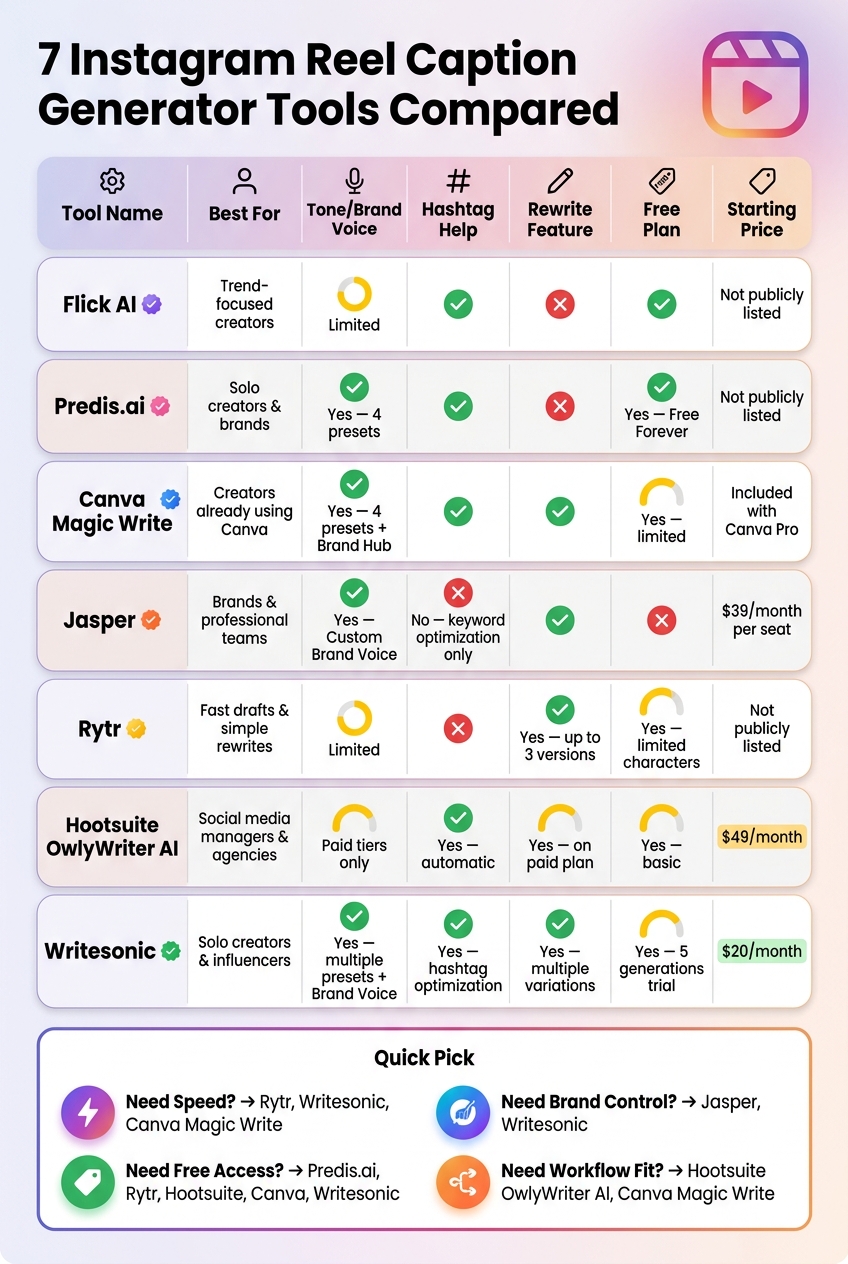
7 Instagram Reel Caption Generator Tools Compared (2024)
Here’s a side-by-side look at the main trade-offs. Some tools are built for fast drafts. Others give you more say over tone, brand voice, or scheduling flow.
| Tool | Reel Caption Strengths | Tone Options | Hashtag Help | Rewrite Feature | Free Plan / Trial | Starting Price | Best For |
|---|---|---|---|---|---|---|---|
| Flick AI | Topic-aware captions with hashtag suggestions | No dedicated tone presets | Trend-based hashtag alignment | No rewrite feature listed | No free plan listed | Not publicly listed | Trend-focused creators |
| Predis.ai | Caption and visual generated together from one prompt | Professional, Casual, Witty, Persuasive | Topic-matched hashtags | No rewrite feature listed | Yes - Free Forever plan | Not publicly listed | Solo creators and brands |
| Canva Magic Write | Hooks, captions, and hashtags from a single prompt | Professional, Friendly, Fun, Inspiring | Yes, via prompt | Yes | Yes - limited on free plan | Included with Canva Pro | Creators and small brands in Canva |
| Jasper | Context-aware captions shaped around topic, hook, and CTA | Customizable Brand Voice | No dedicated hashtag generator | Yes | No - paid only | Starting at $39 per seat/month | Brands and professional teams |
| Rytr | Short, punchy caption options from a topic input | Limited tone control | No dedicated hashtag support | Yes - up to 3 versions at once | Yes - limited monthly characters | Not publicly listed | Fast drafts and simple rewrites |
| Hootsuite OwlyWriter AI | Caption generation inside Hootsuite scheduling | Basic presets | Yes - automatic hashtags | Yes, on Pro | Yes - basic tool free | Starting at $49/month | Social media managers and agencies |
| Writesonic | Fast caption variations with hashtag support | Multiple presets + Brand Voice | Hashtag optimization | Yes - multiple variations | Yes - 5 generations and 25 credits | Starting at $20/month | Solo creators and influencers |
A simple way to read this table:
- Need speed? Rytr, Writesonic, and Canva Magic Write are set up for quick caption output.
- Need brand control? Jasper and Writesonic give you more direction over voice and messaging.
- Need free access? Predis.ai, Rytr, Hootsuite OwlyWriter AI, Canva Magic Write, and Writesonic all offer some kind of free use.
- Need a smoother workflow fit? Hootsuite OwlyWriter AI works well for teams already scheduling posts, while Canva Magic Write makes sense if your content work already lives in Canva.
If price is the main thing you care about, the next section breaks these tools down by fit for creators, brands, and agencies.
Best Tools for Creators, Brands, and Agencies
Use the comparison above to trim the list, then pick the tool that fits the way you publish. Solo creators, brands, and agencies don’t work the same way, so they don’t need the same mix of speed, control, and scale.
Best tools for solo creators
If you’re publishing on your own, speed and price usually come first. Writesonic stands out for creators who want fast output without much setup. Predis.ai also makes sense if you’d rather begin with a free plan.
Best tools for brands
Brands usually care more about staying on-brand than pushing out the most content possible. Jasper is the best match for teams that need a steady voice across campaigns. Writesonic is also a good choice for smaller brand teams that want Brand Voice support at a lower cost.
Best tools for agencies
Agencies usually need scale and smoother client work. Hootsuite OwlyWriter AI is a good fit if you want caption writing, scheduling, and analytics in one place.
Conclusion
Use the comparison table to narrow your choice. If you want fast hook ideas, go with Writesonic. If brand control matters more, Jasper is the better pick. If hashtags are a big part of your process, Flick is the best match. And if price is your main concern, Writesonic's Individual plan starts at $16/month when billed annually.
It also makes sense to test the free or trial versions before you commit. Writesonic gives you a one-time trial with 5 generations, and Hootsuite has a basic free generator.
Choose the tool that fits your workflow, posting volume, and brand voice, and stick with it for a while.
FAQs
How do I choose the right Reel caption tool for my workflow?
Choose a tool based on your content goals, team setup, and technical needs. Start with a simple question: do you need a standalone generator for fast ideas, or do you need an all-in-one platform for planning, scheduling, and performance tracking?
It also helps to check the basics before you commit. Look for tone customization, grammar checks, and rewrite options so the output sounds like your brand, not everyone else’s. If you handle more than one account, collaboration tools can make day-to-day work a lot smoother.
A smart way to compare options is to test three to five tools using the same prompts. That side-by-side test makes it much easier to see which one feels the most intuitive and which one gives you the best output.
Do free Reel caption tools offer enough for regular posting?
Yes, free Reel caption tools can be enough for regular posting.
They help you move faster by generating multiple captions that fit the context of your Reel. Many also let you adjust the tone, caption length, and hashtag mix, which makes drafting easier and cuts down on writer’s block.
That said, they work best as drafting tools, not a full posting system. You’ll still need to review the caption, make any edits, and publish the post on Instagram yourself.
What features matter most for better Instagram Reel engagement?
For Instagram Reels, engagement comes down to brevity and a strong hook. Keep captions short and punchy - ideally under 100 to 125 characters - because a lot of users will scroll right past a long block of text. Those first 125 characters need to do the heavy lifting and grab attention fast.
Wrap up with a clear CTA, then add 3 to 5 relevant hashtags. Track saves, shares, and comments to see which hooks and caption patterns connect best with your audience.


