

One missed disclosure can cost up to $50,120 per violation in FTC civil penalties. If I post sponsored content on Instagram, I need to do four things before publishing: say it clearly, put it where people will see it, turn on the Paid Partnership label, and keep a record of what went live.
Here’s the short version:
- A post is sponsored if I got money, free product, affiliate income, travel, a discount, or some other thing of value as part of making money on Instagram.
- The Paid Partnership label by itself is not enough.
- Feed posts need disclosure at the start of the caption, usually within the first 80–100 characters.
- Stories need a visible disclosure on every sponsored frame.
- Reels and video posts need disclosure in the first few seconds with on-screen text, spoken words, and caption text.
- Lives need disclosure at the start and then again every 10–15 minutes for people who join late.
- I should do a mobile check before posting to make sure text is readable and not covered by Instagram buttons.
- After posting, I should save screenshots or screen recordings and log who approved the asset.
Bottom line: if the brand relationship affects the post, I should disclose it in plain words like “Ad,” “Sponsored by [Brand],” or “Paid partnership with [Brand].” Then I should make sure people can see it fast, on any format, without hunting for it.
That’s the whole checklist in one view before I get into the post-by-post details.
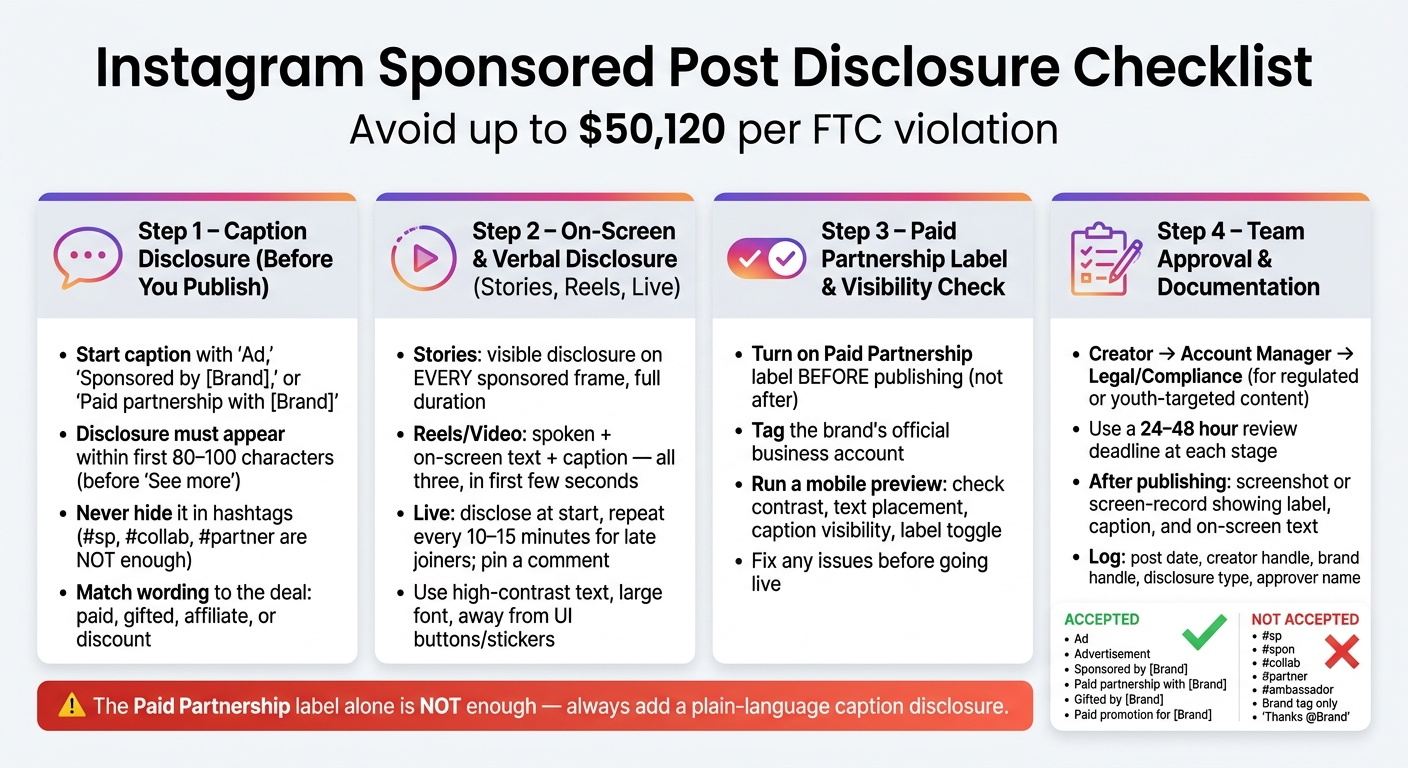
Instagram Sponsored Post Disclosure Checklist: 4 Steps to FTC Compliance
DISCLOSE BRAND PARTNERSHIPS
sbb-itb-3c55afb
Checklist 1: Caption Disclosure Before You Publish
Run these caption checks before you publish.
Start the Caption with a Clear Disclosure
Use plain English terms like "Ad", "Sponsored by [Brand]," or "Paid partnership with [Brand]." Put the disclosure in the first 80 to 100 characters so people can see it before "See more." On mobile, Instagram usually cuts off captions at about 125 characters.
Caption checklist:
- Does the caption start with a clear disclosure term?
- Can people see the disclosure on mobile without tapping "See more"?
- Is the disclosure in the caption text, not just in hashtags, comments, or the bio?
Avoid Vague Tags and Buried Hashtags
Don't hide the disclosure in hashtags or use unclear tags like #sp, #collab, or #partner. Just tagging a brand or saying "Thanks @Brand for the goodies!" without saying what the relationship is doesn't cut it either.
| Accepted disclosure terms | Ambiguous / insufficient terms |
|---|---|
| "Ad" / "Advertisement" | "#sp" |
| "Sponsored post" | "#spon" |
| "Sponsored by [Brand]" | "#collab" |
| "Paid partnership with [Brand]" | "Partnered with [Brand]" |
| "Paid promotion for [Brand]" | "Thanks @Brand" (no mention of gift or payment) |
| "Gifted by [Brand]" | "#ambassador" |
| "I received this product for free from [Brand]." | Brand tag only (e.g., "@Brand") |
Match the Disclosure to the Actual Relationship
Your wording should match the deal: paid, gifted, affiliate, or discount code. If the label is off, readers get the wrong idea.
Here’s how the wording should change based on the arrangement:
- Paid sponsorship: "Ad – Paid partnership with [Brand]. I was compensated to create this post."
- Gifted product: "Gifted by [Brand] – They sent me this product for free to try and share my thoughts."
- Affiliate commission: "Ad – I earn a commission from purchases made through this link."
- Discount code with personal benefit: "Ad – [Brand] provided this code; I may benefit when you use it."
Don’t call paid work gifted.
If the caption alone can’t do the job, use the next checklist for on-screen or spoken disclosure.
Checklist 2: On-Screen and Verbal Disclosure for Stories, Reels, and Live
For Stories, Reels, and Live, the disclosure needs to appear inside the content itself. If the caption alone doesn’t do the job, put the disclosure right into the format people are watching.
Stories: Keep the Disclosure Visible on Every Sponsored Frame
The FTC specifically calls out Instagram Stories: the disclosure should appear on-screen and stay up long enough to read for the full frame. Use short labels like Ad or Sponsored. Make the text big enough to read on a 5–7 inch phone screen, use high-contrast colors, and keep it clear of buttons, stickers, and app overlays.
If your Story has multiple sponsored frames, each sponsored frame needs its own disclosure - not just the first one. People tap fast, and plenty of viewers will land in the middle of the sequence. One simple fix: save an Ad text style in your editing app so you can drop it in each time without slowing yourself down.
Reels and Video Posts: Disclose in the First Few Seconds
For Reels and video posts, use all three: spoken disclosure, on-screen disclosure, and caption disclosure. Start with a line like "Sponsored by [Brand]" right away, and show matching on-screen text in a large, high-contrast font long enough to read. Then repeat the disclosure in the first line of the caption.
A quick gut check helps here: watch the Reel on your phone with sound on, then with sound off. If the sponsorship isn’t obvious at a glance, the disclosure needs to be bigger, earlier, or both.
Instagram Live: Repeat the Disclosure for Late Joiners
Instagram Live is different because people come in at different times. Say the sponsorship at the beginning. Then repeat it every 10–15 minutes and again when a new sponsored segment starts. A simple re-entry line works well: "If you just joined, this Live is sponsored by [Brand]."
Also pin a comment that says "Sponsored Live with [Brand]."
Use this quick format check before publishing.
| Format | On-screen disclosure | Verbal disclosure |
|---|---|---|
| Reels | Yes - early, high-contrast, long enough to read | Yes - at the start, plain-language statement |
| Stories | Yes - every sponsored frame, full duration | Only if the Story includes spoken content |
| Live | Recommended - pinned comment or banner during stream | Yes - at start and repeated for late joiners |
Checklist 3: Paid Partnership Label and Final Visibility Checks
After you add the disclosure to the caption, frame, or audio, make sure the label is turned on and easy to see on screen.
Turn On the Paid Partnership Label Before Posting
Use the Paid Partnership label any time there's a material connection. Turn it on in the post, Reel, or Story composer, then tag the brand’s official account. Do this before you publish. Don’t go back and add the label later.
Label checklist:
- Is the Paid Partnership label turned on in the composer?
- Is the brand’s official business account tagged, not a fan page or regional handle?
- Is the label visible at the top of the post, right under your username?
Run a Mobile Visibility Check
Preview the post on your phone before it goes live. This is where small problems show up fast.
| What to check | What can go wrong |
|---|---|
| On-screen text contrast | Low contrast against the background makes it unreadable |
| Text placement | Too close to the edges gets cropped or covered by UI bars |
| Stickers and interactive elements | Polls, GIFs, or product tags overlap the disclosure text |
| Caption disclosure | Disclosure does not appear above "See more" |
| Paid Partnership label | Toggle left off or brand account tagged incorrectly |
Fix anything on that list before publishing. Once everything is clear on mobile, capture the live version for your records.
Document What Was Published
Use a social media workflow for internal review and final sign-off.
After publishing, take a screenshot or short screen recording that shows the Paid Partnership label, the caption disclosure, and any on-screen text. Save it in a shared folder named with the date, brand, and format. Then log the post time, creator handle, brand handle, disclosure type, and approval notes.
Checklist 4: Agency and Team Approval Workflow
Catch disclosure mistakes before a post goes live. After publishing, fixes eat up time, chip away at trust, and can turn into compliance cleanup.
Once the caption, frame text, and label are ready, send every asset through the same review path.
Assign Clear Pre-Post Review Roles
Every sponsored post should have at least one reviewer other than the creator.
The creator drafts the caption disclosure, on-screen text, and any verbal disclosure. They also turn on the Paid Partnership label.
The account manager checks the wording, placement, and brand tag.
If the campaign involves a regulated category or is aimed at younger audiences, send the asset to legal or compliance before final sign-off.
Use a Standard Sign-Off Process for Every Sponsored Asset
Use one sign-off path across formats. What changes are the format checks, not the process itself.
| Asset Type | Creator | Account Manager | Legal/Compliance |
|---|---|---|---|
| Feed Post | Writes first-line caption disclosure; turns on Paid Partnership label | Confirms disclosure is visible above "See more"; verifies brand tag | Reviews regulated claims |
| Carousel | Adds disclosure in caption and at least one slide | Checks all slides for consistent disclosure | Reviews required disclaimers |
| Reel/Video | Scripts verbal disclosure early; adds on-screen text | Checks text size, contrast, and timing in first few seconds | Reviews potentially misleading endorsements |
| Story | Adds disclosure on every sponsored frame; keeps text clear of UI elements | Verifies every frame is labeled; checks link stickers and CTAs | Reviews campaigns targeting minors or regulated industries |
| Live | Discloses sponsorship at the start; plans recurring verbal reminders | Confirms Live description and any saved recap include disclosure | Advises on disclosure frequency for longer sessions |
After review, record who approved the asset and when. To keep campaigns moving, many teams use a 24- to 48-hour review deadline at each stage.
Keep a Written Approval Log
Before the post goes live, log the reviewer name, date, asset version, and final approval status.
That log should also connect to the caption copy, on-screen text, verbal disclosure, label status, and mobile visibility check. The goal is simple: keep every approval point in one place, so nothing slips through.
Conclusion: A Short Summary of a Compliant Instagram Sponsored Post
A compliant sponsored post uses clear disclosure, the Paid Partnership label, mobile visibility checks, and written approval before publishing.
FAQs
What counts as a material connection on Instagram?
A material connection is any link to a brand that could change how followers see your recommendation - and that they probably wouldn’t expect on their own.
That can include paid sponsorships, free products, PR packages, trips, event invites, affiliate commissions, discount codes, and personal or business relationships. For example, you may be an employee, contractor, investor, relative, or brand ambassador.
If you mention the brand in a post, say so clearly.
Do I need a disclosure if I only got a free product?
Yes. If a brand sent you a free product, a PR package, or a gift, you still need to say so.
The FTC sees that as a material connection. And that applies even if:
- you weren’t paid
- the brand didn’t ask you to post
- the item showed up without you asking for it
Use plain language like "Gifted by [Brand]" or "PR package from [Brand]". Put that disclosure at the start of your caption or in on-screen text where people can easily see it.
Also, don’t depend only on the Paid Partnership label.
Where should I place a disclosure in a carousel post?
For an Instagram carousel post, put the disclosure at the very start of the caption so people see it before the “more” cut-off. It needs to be clear, easy to spot, and visible without any extra taps.
Use plain wording like Ad or Sponsored in the first line. Instagram’s Paid partnership label can help, but it does not replace a clear disclosure in the caption.


